Mesh rendering with lighting
MLX3D has two mesh rasterizers, mirroring the PyTorch3D split:
rasterize_meshes— a hard z-buffer rasterizer backed by a Metal kernel. It resolves visibility (nearest triangle per pixel) and returnsFragments. Memory use isO(H·W), so it stays fast at high resolution.render_mesh_soft— a SoftRas-style rasterizer whose coverage is differentiable, for silhouette gradients.
Use the hard path for fast forward rendering and shading; reach for the soft one when the loss needs gradients through the silhouette itself.
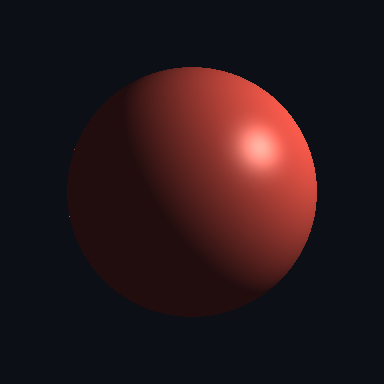
A lit render in one call
render_mesh composes the rasterizer with a
Blinn-Phong shader and a list of lights, and returns
{"image", "alpha", "depth", "normals"}:
import mlx.core as mx
from mlx3d.cameras import Camera
from mlx3d.renderer import render_mesh, PointLights, AmbientLights
from mlx3d.io import save_image
from mlx3d.utils import ico_sphere

mesh = ico_sphere(level=5, radius=1.0)
camera = Camera.look_at(eye=(2.4, 1.8, 2.4), at=(0, 0, 0), fov=45.0, width=512, height=512)

out = render_mesh(
    camera, mesh,
    verts_colors=mx.full((mesh.verts_packed().shape[0], 3), mx.array([0.85, 0.3, 0.25])),
    lights=[PointLights(location=(3, 3, -2)), AmbientLights(color=(0.15, 0.16, 0.2))],
    shininess=48.0, specular_strength=0.45, background=(0.05, 0.06, 0.09),
)
save_image("sphere.png", out["image"])
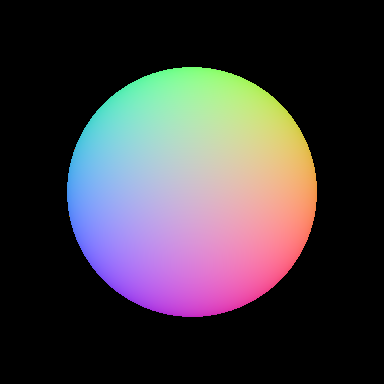
The normals buffer is handy for debugging and for normal-based effects:
Lights
Three light types are provided, all differentiable:
PointLights— a light at a world-spacelocation.DirectionalLights— a light at infinity travelling alongdirection.AmbientLights— uniform fill light.
Shading is two-sided by default: each normal is oriented toward the camera before lighting, so meshes with inward or inconsistent winding (very common in the wild) still light correctly instead of rendering black.
PBR-style materials
Use shading="pbr" for a compact Cook-Torrance/GGX material preview with
base color, roughness, and metallic controls:
out = render_mesh(
    camera, mesh,
    verts_colors=mx.full((mesh.verts_packed().shape[0], 3), mx.array([0.8, 0.25, 0.1])),
    lights=[PointLights(location=(3, 3, -2)), AmbientLights(color=(0.04, 0.04, 0.04))],
    shading="pbr",
    roughness=0.35,
    metallic=0.2,
)
This is not a full environment-lit offline renderer; it is a fast, differentiable material model for inspecting glTF-style assets and optimizing material parameters inside MLX.
In 0.2.0, mlx3d-render can load textured glTF/GLB meshes and forward uniform
glTF metallic/roughness factors into this PBR shader:
mlx3d-render model.glb --type mesh --out preview.png --shading pbr --ssaa 2
For asset-heavy workflows, this gives a quick local preview before you move to a full DCC tool or game engine.
Antialiasing and render passes
Pass ssaa=N to supersample (render at N x resolution and box-downsample) for
clean, antialiased silhouettes. render_mesh also returns extra render passes
(AOVs) alongside the image: depth, normals, position (world-space hit
point) and face_id (nearest face index, -1 where empty).
out = render_mesh(camera, mesh, ssaa=3)   # antialiased
seg = out["face_id"]                        # per-pixel face index
Textured meshes
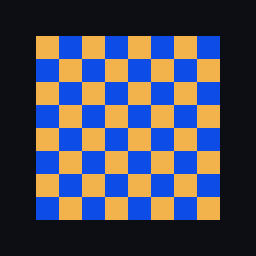
Pass a texture plus UV coordinates to shade from an image instead of vertex
colors. UVs are interpolated over the fragments and the texture is sampled
bilinearly (differentiable w.r.t. the texture, so it can be optimized):
out = render_mesh(
    camera, verts, faces,
    texture=image,            # (H, W, 3) in [0, 1]
    verts_uvs=verts_uvs,      # (VT, 2)
    faces_uvs=faces_uvs,      # (F, 3) indices into verts_uvs
    shading="none",
)
Working with fragments directly
For custom shading, rasterize once and interpolate any per-vertex attribute
yourself. The barycentric coordinates in Fragments are differentiable w.r.t.
the vertex positions, so gradients still reach geometry:
from mlx3d.renderer import rasterize_meshes, interpolate_face_attributes

frag = rasterize_meshes(camera, mesh)          # Fragments(pix_to_face, zbuf, bary, ...)
albedo = interpolate_face_attributes(frag, my_vertex_colors)   # (H, W, 3), differentiable
This is exactly how render_mesh is built, and it composes with the
Renderer protocol like everything else in the pipeline.
Speed
The hard rasterizer is dramatically faster than the soft one because it never materializes per-face image buffers. On an M-series GPU, an icosphere at 160×160 renders in a few milliseconds versus ~100 ms for the soft path (>30×), and it scales to 512×512 comfortably. The trade-off is that visibility is discrete (no silhouette gradient) — which is why both rasterizers exist.