Agent guide
Skywalker is designed so that an AI agent can do everything a person can in the editor, see the result, test it, and hand it back for review. This guide explains how agents see and act, how the MCP server is organised, how skills and permissions shape what an agent does, and the patterns that make agents effective.
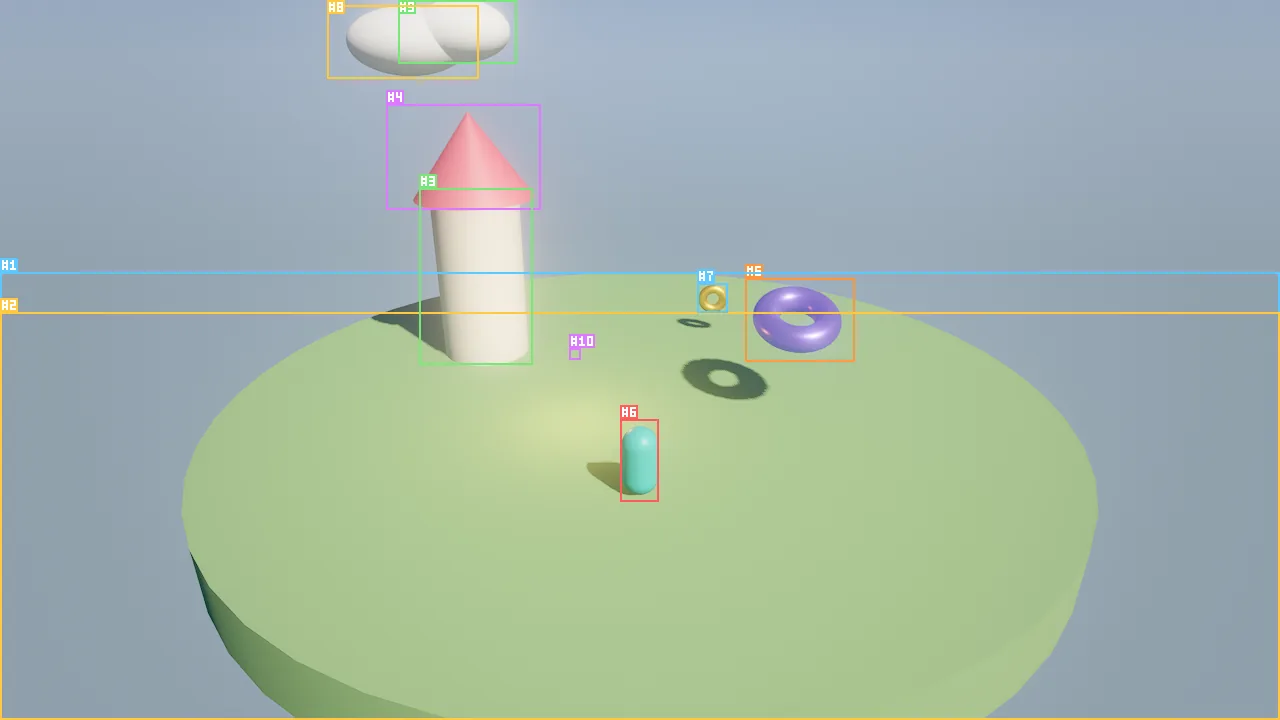
viewport_capture {"annotate": true}: the image an agent receives, with every entity boxed and labelled by its stable id. The structured result lists the same boxes as numbers.Design principles
Everything is a tool. Every capability is a named tool with an LLM-oriented description, a JSON Schema and a handler. The editor's buttons, the in-editor crew, the CLI and external MCP clients all call the same 195 tools, so a person and an agent never have different powers, and every UI action is scriptable. Arguments are validated before a tool runs (types, enums, required and unknown keys) and errors carry a stable code, a message and a hint, often did you mean …?.
Agents can see. viewport_capture returns an image plus every visible entity's screen box and id, optionally with
#id labels drawn on the image. Debug views show albedo, normals, GI, overdraw, LODs and more; viewport_multi adds
orthographic views for layout; perf_stats measures the frame. See How agents see.
Everything is undoable and attributed. Each edit records its actor (user, agent:Nimbus, mcp:claude-code).
batch makes many edits atomic: all succeed as one undo step, or everything rolls back and the failing index is
reported. history undoes anyone's edits.
The simulation is deterministic. Fixed 1/60 s ticks, scene-order processing, seeded randomness and ordered events
mean an agent can play the game with sim_input, step it, and get the same result every time. Tests (wander_test),
traces (sim_trace) and playtest bots (playtest_run) build on this.
One studio for every client. The studio (roster, board, feedback, loops, playtests) lives in the engine and the project, so the editor's crew, the headless runner and external agents share it.
Ways an AI works with Skywalker
| Way | What it is | Where to read |
|---|---|---|
| External agents over MCP | Claude Code, Codex, Gemini CLI, Cursor or any MCP client, attached to the editor or headless | The MCP server, Skills and integrations |
| The studio and the crew | Specialist agents ("Cloudlings") with roles, a task board, feedback, director decisions, playtests and loops | Studio and crews |
| Your own agent programs | Agents, workflows, shared memory, approvals and tracing in Python, on the same tools and studio | Python agents |
| Generators | Image, 3D, audio and video models that fulfil asset_request entries |
Assets and prefabs |
The loop
Every effective session follows the same five steps:
- Orient once.
engine_info(version, renderer, component types, tool categories), thenscene_overview(every entity as one line, the environment, the selection). - Act in batches.
batchfor three or more edits;scatter,foliage_addandprefab_instantiateinstead of loops of single creates. - Look.
viewport_captureafter every meaningful change. Never claim something looks right without capturing it. - Verify. Behaviors with
wander_test,sim_input+sim_control step+logsorsim_trace; layout withviewport_multi; looks with debug views; gameplay withplaytest_run; cost withperf_stats. - Fix or finish. Undo with
historyand try differently; when done,scene_saveand report.
engine_info {}
scene_overview {"max_entities": 200}
batch {"operations": [{"tool": "entity_create", "args": {"name": "Tent", "mesh": "cone", "color": "#c8a165", "position": [0, 1, 0], "scale": [2, 2, 2]}}, {"tool": "entity_create", "args": {"name": "Fire", "position": [3, 0.6, 1], "components": {"light": {"kind": "point", "intensity": 6, "color": "#ff9a4a", "range": 14}}}}]}
viewport_capture {"annotate": true}
scene_save {"path": "scenes/main.sky.json"}
Conventions agents must know
| Convention | Value |
|---|---|
| Units and axes | Meters, +Y up, entities face −Z, rotations are Euler degrees [pitch, yaw, roll] |
| Colors | "#rrggbb" or [r, g, b] in 0..1; emissive alpha is strength and may exceed 1 (HDR) |
| Entity references | A numeric id or an exact name; ids are stable and never reused, so prefer them after creation |
| Component edits | entity_update merges fields; null removes a component; component_schema lists every field |
| Persistence | Edits are in memory; headless sessions keep nothing until scene_save |
| Play mode | Edits made while playing are discarded on stop; stop, edit, play again |
In this guide
- How agents see — captures, set-of-mark labels, debug views, multi-views, performance numbers.
- The MCP server — modes, transports, tools, resources and prompts, identity and attribution.
- Skills and integrations — the thirteen skills, subagents and workflow commands per client.
- Python agents — the Python agent layer: engine client, agents, memory, workflows, tracing.
- Custom tools — tools agents define themselves: Wander, composite and hosted, with capabilities and approval.
- Permissions and approvals — tool annotations, categories, autonomy levels, open-world tools.
- Best practices and prompts — patterns, prompt templates and anti-patterns.