Install and build
Skywalker builds from source with CMake presets. One configure and build produces the engine library, the skywalker
CLI and MCP server, the standalone skywalker-player, the test suite and, on macOS, the SwiftUI editor
(Skywalker.app). Dependencies are fetched automatically from their official repositories at pinned versions.
Requirements
| Requirement | Version | Notes |
|---|---|---|
| macOS | 15 or later | Apple silicon recommended; the renderer is Metal |
| Xcode | 16 or later | Swift 6 for the editor; the command-line tools are enough for the CLI |
| CMake | 3.29 or later | brew install cmake |
| Ninja | any recent | brew install ninja; the editor build requires the Ninja generator |
| Python 3 | optional | integration checks, the documentation site and media scripts |
| Metal toolchain | optional | precompiles the shader library (xcodebuild -downloadComponent MetalToolchain); without it shaders compile at startup |
Build
Use the release build for day-to-day editing: debug builds are several times slower on the CPU.
The outputs land in build/<preset>/bin/:
| Output | What it is |
|---|---|
Skywalker.app |
The editor (macOS presets release and debug) |
skywalker |
The headless engine: MCP server, renderer, simulator, Wander compiler, tool runner, packager, movie renderer |
skywalker-player |
The standalone game runtime that skywalker build packages into apps |
Limit parallel jobs on laptops
A full build compiles physics, navigation and the engine in parallel. On a 16 GB machine shared with other work,
pass -j 4 to cmake --build.
Presets
| Preset | Purpose |
|---|---|
release |
Optimized build with the editor |
debug |
Day-to-day engine work: editor, CLI, tests |
headless |
Engine, CLI and tests only (Linux or CI friendly) |
asan |
AddressSanitizer and UndefinedBehaviorSanitizer (engine, CLI and tests) |
tsan |
ThreadSanitizer |
The release, debug, headless and asan presets build with warnings as errors.
Run the tests
The doctest suite covers the JSON core, ECS and reflection, scenes and history, the Wander compiler and runtime, the render front end, every tool schema, MCP, physics, animation, audio, the studio, packaging, movie rendering and the integrations. It also checks that the agent skills and this site's generated reference match the live tool registry.
Put the CLI on your PATH
Agent configurations point at the skywalker binary. Link it somewhere stable:
skywalker setup writes the absolute path of the binary you run it with, so you can also skip this step and call
setup from the build folder.
Open the editor
File › Open Project… (Cmd+O) switches projects later; the editor reopens the last one.
Folder-access prompts
Debug builds are ad-hoc signed, and macOS asks again for access to ~/Documents (or Desktop, Downloads) after
each rebuild. Sign with a stable identity to avoid it: configure with
-DSKY_CODESIGN_IDENTITY="Apple Development", or keep projects outside protected folders.
Verify the install
skywalker render examples/hello_sky/scenes/main.sky.json -o hello.png --annotate
skywalker run examples/hello_sky/scenes/main.sky.json --ticks 120
skywalker tools --markdown | head -20
The first command writes hello.png with every visible entity labelled by its id; the second simulates two seconds
of play and prints the behaviors' logs; the third lists the tools. If the Metal renderer is not
available the CLI falls back to the CPU renderer automatically.
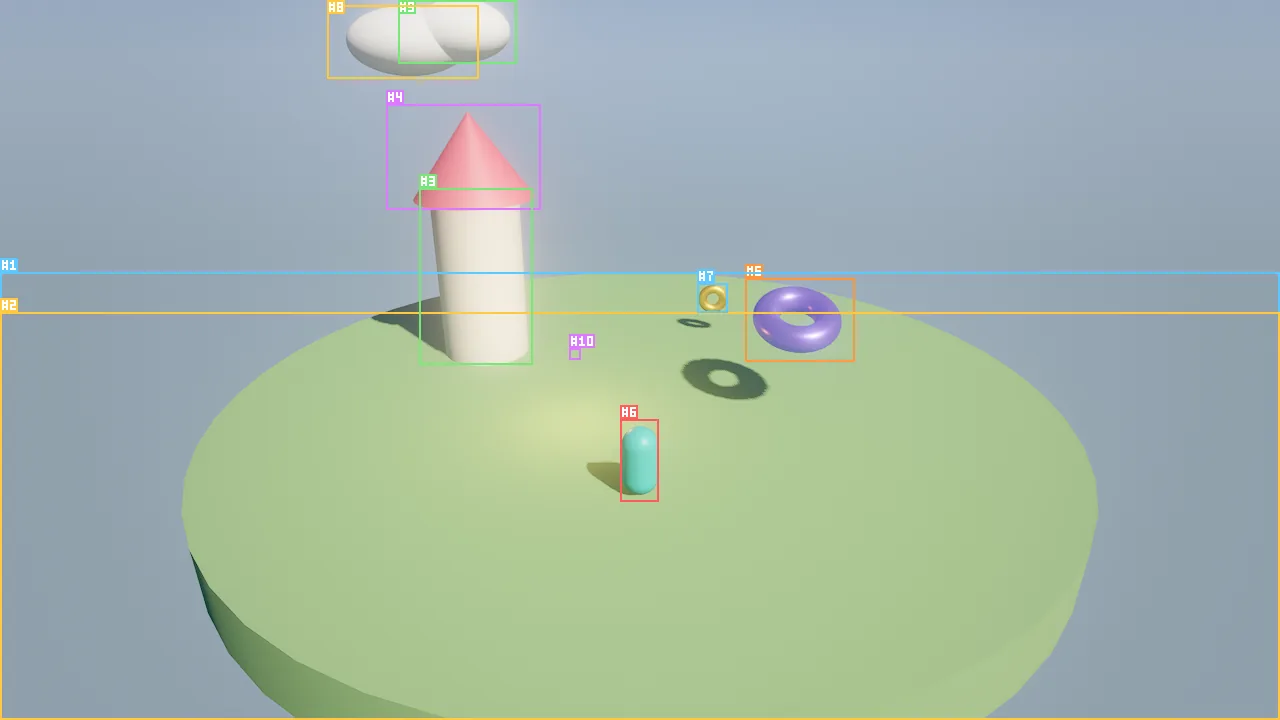
examples/hello_sky: every entity is boxed and labelled with its id, so a person or an agent can refer to #4.Troubleshooting
| Symptom | Fix |
|---|---|
| CMake is too old | brew upgrade cmake (3.29 or later) |
| The editor target is skipped | The SwiftUI editor needs the Ninja generator and Xcode 16; use the presets, which select Ninja |
A build in ~/Documents fails with timeouts or truncated reads |
iCloud may have evicted files to placeholders. Read them once to rehydrate, or keep the checkout outside iCloud-synced folders |
| The first launch takes a few seconds | Shaders compile at startup without the offline Metal toolchain; later launches use the pipeline cache |
Next: Your first project.