Components
Components are the data of an entity: where it is (transform), what it looks like (mesh, sprite), how it
lights the world (light), how it moves (body, character), what it sounds like (audio). Each component is a
plain C++ struct with a reflected field table, and that one table gives you scene-file JSON, validation, the schema
agents read, the editor's property grid and Wander property access. This page explains the model, how to read and
write components from every surface, and how to add a component to the engine.
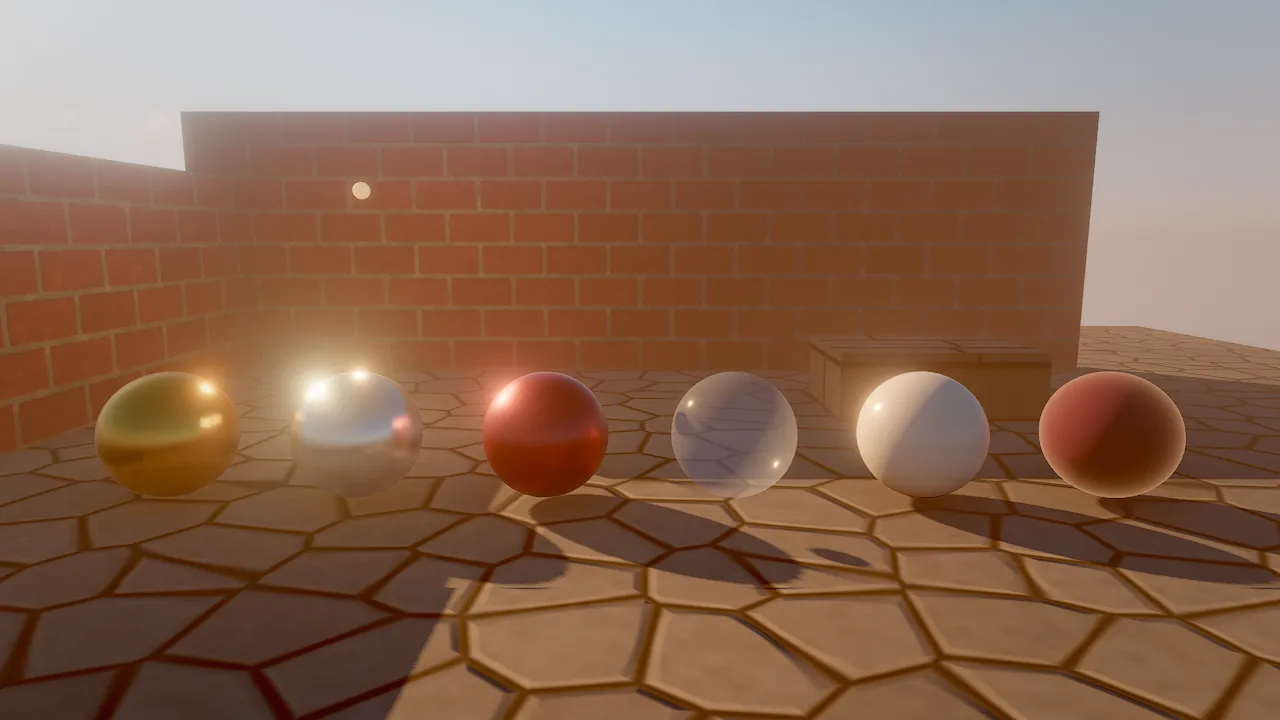
mesh fields for the spheres' material presets, a point light for the warm lamp, and the scene environment for the sunset sky.Concepts
Plain structs, one field table
A component is a struct with default values and a static type() that returns its field table. Each row of the
table names a member, its type, a one-line description and, where it applies, a range or a list of allowed values.
There is no base class, no virtual function and no hand-written serializer.
From that one table the engine derives:
| Derived from the table | Where you meet it |
|---|---|
| JSON in and out | Scene files, prefabs, entity_get, entity_update |
| Validation | Types and enum values are checked on every write and numbers are kept inside their range; unknown fields fail with a did you mean …? hint, and a rejected patch leaves the component unchanged |
| JSON Schema | component_schema, the argument schemas of entity_create and entity_update, the reference |
| Editor property grid | The Details panel: one row per field, with a control chosen from the field's type, range and allowed values |
| Wander access | self.light.intensity, find("Door").mesh.color, self.process.mode |
Field types are number (float or integer), bool, string, vectors ([x, y, z], also 2- and 4-component),
colors and enums, plus structured JSON for fields that hold lists or maps (animation clips, UI layouts). Colors accept
"#rrggbb", "#rrggbbaa" or [r, g, b(, a)] in 0..1; for emissive, the alpha channel is the strength.
Partial updates
Writes are patches. entity_update {"entity": "Lamp", "components": {"light": {"intensity": 5}}} changes one field
and leaves the others alone. Setting a component to null removes it; patching a component an entity does not have
adds it with defaults for every field you did not give. Scene files may therefore list only the fields that differ
from the defaults.
Components versus behaviors
Components hold data and are processed by engine systems (renderer, physics, audio, animation). Behaviors hold
logic: an intent plus Wander code that reads and writes components. Keep tunable numbers in components or in
behavior params, and keep rules in behaviors. See Wander scripting.
Component families
| Family | Components | Reference |
|---|---|---|
| Core | transform, mesh, light, camera, process, plus the scene-wide environment |
Core |
| World and effects | terrain, foliage, water, particles, fluid, groom |
World and effects |
| 2D, text and UI | sprite, sprite_anim, tilemap, light2d, parallax, camera2d, text, ui_canvas, ui, dialogue |
2D, text and UI |
| Audio | audio, listener |
Audio |
| Physics and navigation | body, collider, character, joint, physics_world, navmesh, nav_agent |
Physics and navigation |
| Animation | animator, attach, ik, sequencer |
Animation |
The engine has 34 components plus the environment. The manual pages explain each family in context:
Rendering, Terrain, Visual effects, Hair and fur,
2D and UI, Audio, Physics and navigation, Animation and
Simulation and time for process.
The core components at a glance
| Component | Key fields | Defaults worth knowing |
|---|---|---|
transform |
position, rotation (Euler degrees: pitch X, yaw Y, roll Z), scale |
Relative to the parent. Meters, +Y up, entities face −Z. |
mesh |
mesh (a primitive or "asset:<path>"), color, metallic, roughness, emissive, material, shading, maps |
mesh cube, roughness 0.55, castShadows true, layers 1 |
light |
kind, color, intensity, range, spotAngle and more |
kind point, intensity 1, range 10 m |
camera |
fov, orthographic, aperture, focusDistance, motionBlur, primary |
fov 60, far plane 500 m; the first primary camera is the game camera |
process |
mode, priority, clock, interpolation |
Everything inherit: the entity follows its ancestors |
Primitive meshes are cube, sphere, plane, cylinder, cone, quad, capsule and torus.
How to read and write components
component_schema {"component": "light"}
entity_get {"entity": "Lamp"}
entity_update {"entity": "Lamp", "components": {"light": {"intensity": 5, "temperature": 2700}}}
entity_update {"entity": "Lamp", "components": {"camera": null}}
entity_create {"name": "Spot", "position": [0, 4, 0], "rotation": [-90, 0, 0], "components": {"light": {"kind": "spot", "spotAngle": 30, "range": 12}}}
component_schemareturns the JSON Schema of one component (or of all of them, and the environment) with field docs, ranges and enums. Agents should read it before writing an unfamiliar component.entity_createaccepts full component objects incomponents;entity_updatemerges them field by field.- In Wander, any entity's component fields are properties:
self.light.color,find("Gate").transform.position,other.body.mass.has(e, "light")checks whether a component is present. The common shortcutsposition,rotation,scaleandcolorwork on every entity. - In the editor, select an entity and edit its fields in the Details panel. Add Component lists every component;
each section has a remove button except
transform.
Errors you will see
Validation happens before anything changes, and the error names the field:
| Mistake | Result |
|---|---|
{"light": {"intensty": 5}} |
unknown_field: light has no field "intensty", the list of fields, and the hint did you mean "intensity"? |
{"light": {"kind": "area"}} |
invalid_value: light.kind must be one of: directional, point, spot |
{"mesh": {"roughness": 7}} |
Accepted and clamped to the field's range (here 1). Read the value back with entity_get when it matters. |
Because every editor action and every agent call goes through the same tools, the editor and agents can never write data the other cannot read.
How to add a component (engine developers)
Adding a component to the engine takes one header, one field table and a few one-line registrations. JSON, schema,
the editor grid and Wander access follow automatically. The steps below follow the conventions in AGENTS.md; the
process component (engine/include/skywalker/ecs/ProcessComponent.h, table in engine/src/scene/Process.cpp) is a
compact model to copy.
-
Write the struct in a new header under
engine/include/skywalker/ecs/. Members are plain values with defaults; enums are stored asstd::string.#pragma once // `buoyancy`: makes a dynamic body float on the water surface. #include <string> #include "skywalker/ecs/Reflection.h" namespace sky { struct Buoyancy { float density = 0.6f; // relative to water: < 1 floats float drag = 1.f; // damping while submerged std::string mode = "center"; // center | corners Vec4 splashColor{1.f, 1.f, 1.f, 1.f}; static const TypeInfo& type(); }; } // namespace sky -
Write the field table in a source file with the
SKY_FIELDmacros fromskywalker/ecs/Reflection.h:SKY_FIELD(Type, member, FieldType, doc),SKY_FIELD_RANGE(..., lo, hi),SKY_FIELD_ENUM(..., values...)andSKY_FIELD_JSON(..., schemaText)for structured data. The first string is the component's JSON and Wander name; the second is the description agents and the editor show. Write descriptions for a reader who has never seen the code.const TypeInfo& Buoyancy::type() { static const TypeInfo info{ "buoyancy", "Makes a dynamic body float on the water surface (needs a body and a water entity).", { SKY_FIELD_RANGE(Buoyancy, density, Float, "Density relative to water: below 1 floats", 0.05f, 10.f), SKY_FIELD_RANGE(Buoyancy, drag, Float, "Damping while submerged", 0.f, 20.f), SKY_FIELD_ENUM(Buoyancy, mode, "center = one sample point | corners = four, so it tilts with waves", "center", "corners"), SKY_FIELD(Buoyancy, splashColor, Color, "Tint of the splash particles"), }}; return info; } -
Include the header at the end of
engine/include/skywalker/ecs/Components.h, next to the other component headers, and add the source file toengine/CMakeLists.txt. -
Register the kind with one line in
Scene::registerKinds(engine/src/scene/Scene.cpp): -
Give it a place in the editor: add the name to
componentOrderandaddableineditor/Sources/Views/DetailsPanel.swift, and an icon and a title in the same file. - Use it from a system:
scene.get<Buoyancy>(id)returns the component ornullptr. Anything simulated must be deterministic and reset when play stops (see Simulation and time). - Test and regenerate: add a doctest case under
tests/, build with theheadlessandasanpresets, and regenerate the site reference (python3 website/scripts/dump_data.py --cli build/release/bin/skywalker, thenpython3 website/scripts/gen_reference.py). If agents should know about the component, update the skills underintegrations/skills-src/.
Hub files are shared
Components.h, Scene.cpp, engine/CMakeLists.txt and tests/CMakeLists.txt are edited by many people in
parallel. Keep your change to those files to the single grouped lines shown above.
Recipe: give a prop a glowing, flickering lamp
entity_create {"name": "Lantern", "mesh": "sphere", "position": [2, 1.2, 0], "scale": [0.25, 0.25, 0.25], "components": {"mesh": {"color": "#ffcf8a", "emissive": "#ffb05cff"}, "light": {"kind": "point", "temperature": 1900, "intensity": 3, "range": 6}}}
behavior_set {"entity": "Lantern", "name": "Flicker", "intent": "Flicker like a candle around its base brightness.", "source": "behavior Flicker\n  param base = 3 in 0..20 \"average intensity\"\n  on frame\n    self.light.intensity = base * (0.85 + 0.15 * noise(time * 12))\n  end\nend\n"}
viewport_capture {"samples": 8}
The on frame handler runs once per displayed frame and is cosmetic: its writes are undone after the frame, so the
flicker never changes the simulation. The same behavior as a standalone file:
behavior Flicker
  intent "Flicker like a candle around its base brightness."
  param base = 3 in 0..20 "average intensity"
  on frame
    self.light.intensity = base * (0.85 + 0.15 * noise(time * 12))
  end
end
Pitfalls
- Inline values versus materials. When
mesh.materialpoints at a.mat.json, the material overrides the entity's inline color, PBR values, emissive and texture. Edit the material, or clearmaterial, to change them. nullremoves.{"components": {"light": null}}deletes the light; it does not reset it. To reset fields, write their default values.- Wander writes during play are temporary. Component changes made by scripts are part of the play session and are restored when play stops.
- Some fields are reserved. For example
light.indirectis stored but has no effect until world-space GI exists; the field description says so.
For agents
Read the schema before writing a component you have not used in this session, then write the smallest patch:
component_schema {"component": "camera"}            # fields, ranges, enums, docs
entity_get {"entity": "Main Camera"}                # current values
entity_update {"entity": "Main Camera", "components": {"camera": {"fov": 45, "aperture": 2.8}}}
viewport_capture {"view": "scene", "samples": 4}    # check the result through that camera
Validation errors include a hint; fix the field name or value it names and retry instead of guessing.
Reference
- All components with every field: Components reference
- Tools:
component_schema,entity_get,entity_create,entity_update - Wander:
has,find - Design: docs/ARCHITECTURE.md,
AGENTS.mdin the repository