Wander scripting
Wander is Skywalker's behavior language. You use it to give entities game logic: a guard that patrols, a door that opens, a coin that spins and scores. Every behavior pairs a plain-language intent with deterministic Wander code, so people and AI agents can read what an entity is meant to do and verify that the code does it.
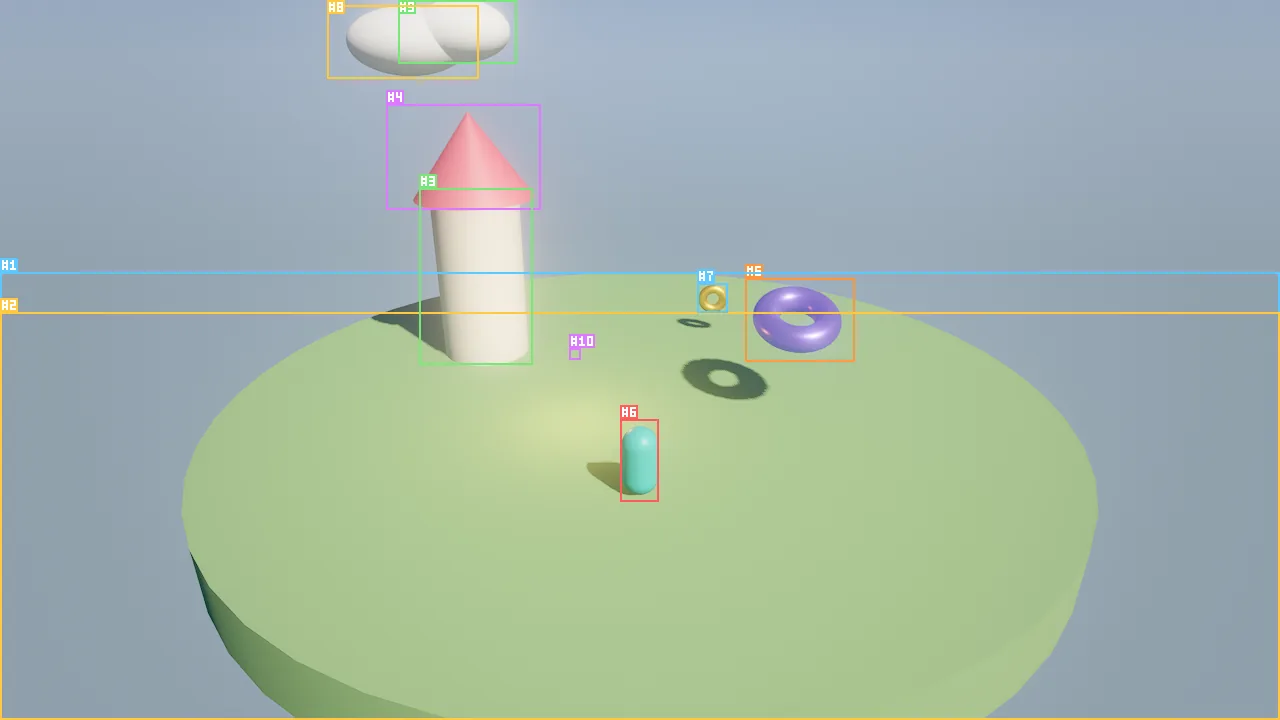
viewport_capture with annotate: true): the hero, the coin and the crystal each run a small Wander behavior.Concepts
Entity, component, prompt
Skywalker organizes a game as ECPS: Entity, Component, Prompt.
| Pillar | What it holds | Example |
|---|---|---|
| Entity | An identity in the scene: name, id, tags, parent | Guard #12, tagged enemy |
| Component | Data: transform, mesh, light, body, audio, ... | light.intensity = 4 |
| Prompt | Behaviors: what the entity does, as intent plus code | "Patrol between two posts; chase the player when close." |
Components describe what an entity is; behaviors describe what it does. An entity can carry any number of behaviors, and each behavior is three things:
| Part | Written by | Role |
|---|---|---|
| Intent | A person or an agent | The source of truth for humans: one or two sentences in plain language |
| Spec (optional) | Usually an agent | Rules derived from the intent, each naming the tests that verify it |
| Code | A person or an agent | The Wander program the engine runs: the source of truth for the runtime |
The spec and the code's test blocks connect the intent to the code. An agent derives rules from the intent, writes
code with one test per rule, and proves the code meets the intent with wander_test before anyone presses play. See
Specs and tests.
Why the language looks the way it does
Wander is designed to be written correctly on the first try, by people and by language models, and to be safe to run whatever it contains.
| Property | What it means for you |
|---|---|
| Keyword-led statements | move self toward goal at 3, emit "open" to door, go to Chase: code reads like the intent it implements, and models write it reliably. |
| Guaranteed termination | Every handler run has a step budget. A buggy or adversarial loop is aborted with an error at its line; it never hangs the engine. |
| Determinism | Fixed 1/60 s ticks, seeded randomness, events delivered in emission order, no wall-clock access. The same scene replays exactly, in tests, traces and movie renders. |
| Precise diagnostics | Every error has a line, a column, a stable snake_case code and a did-you-mean hint. |
| Gradual types | Annotations are optional; the compiler infers types and reports only mismatches that are certain. |
| Sandboxed | Scripts cannot touch files, the network or the clock. Native code is a separate, explicit opt-in (Graphs and native code). |
Under the hood a typed compiler turns source into register bytecode for a small virtual machine, and hot behaviors can be compiled ahead of time to native code with identical results.
A guided tour
The behavior below is complete: it compiles with skywalker check and its tests pass in wander_test. Read it top to
bottom; the numbered notes follow.
behavior Guard
  intent "Patrol between two posts; chase the player when close; lose 1 hp per hit."
  param speed = 3 in 0..10 "walk speed (m/s)"
  var hp = 3
  var posts: list = []

  on start
    posts = [self.position, self.position + (6, 0, 0)]
  end

  state Patrol
    on tick
      let goal = posts[floor(state_time / 4) % 2]
      move self toward goal at speed
      if nearest("player", 5) then go to Chase end
    end
  end

  state Chase
    on enter
      self.color = #ff4040
    end
    on tick
      let p = nearest("player", 8)
      if not p then go to Patrol end
      move self toward p at speed * 1.5
    end
  end

  on event "damage" with hit
    hp -= hit.get("amount", 1)
    if hp <= 0 then
      emit "guard_down" with {at: self.position}
      destroy self
    end
  end

  test "starts on patrol"
    expect state == "Patrol"
  end

  test "loses hp when hit"
    emit "damage" with {amount: 1} to self
    wait frames 2
    expect hp == 2
  end

  test "is destroyed after three hits"
    repeat 3 times
      emit "damage" with {amount: 1} to self
    end
    wait frames 2
    expect not exists(self) "the guard is gone"
  end
end
behavior Guard ... endnames the behavior. A file can hold several behaviors; a file of bare members (on tick ... endwith nobehaviorheader) is one behavior namedMain.intentstores the plain-language goal with the code. Tools and the editor show it next to the code.param speed = 3 in 0..10 "..."declares a tunable: a variable with a constant default, a range and a description. The editor shows it as a slider and the spec lists it.var hp = 3declares per-entity state. Initializers never overwrite a value the entity already has, so a designer can sethpto 10 on one guard in the inspector. While the game plays, vars are mirrored into the entity after every tick, soentity_getalways shows current values.on startruns once, the first tick the behavior runs.state Patrolandstate Chaseform a state machine. The first state is the initial one;go to Chaseswitches, runningon exitof the old state andon enterof the new one.state_timeis the time spent in the current state.move self toward goal at speedis a transform statement. Distances are meters, speeds meters per second, and the statement scales by the tick length for you.nearest("player", 5)is a builtin: the nearest entity taggedplayerwithin 5 m, ornone. Every builtin is listed in the generated builtins reference.on event "damage" with hitreceives an event and names its payloadhit(a map).otheris the sender.emit ... with {...}sends an event with a payload; it arrives next tick.destroy selftakes effect at the end of the tick.test "..."blocks run only in the sandbox ofwander_test:emitinjects events,waitadvances simulated time,expectchecks a condition and reports the compared values when it fails.
The full grammar is in Language.
How behaviors attach to entities
A behavior lives on an entity, in the scene file, next to its components. Each entry stores the name, the intent, the optional spec, the source and whether it is enabled:
{
  "name": "Crystal",
  "behaviors": [
    {
      "name": "Hover",
      "intent": "Float gently up and down and slowly spin, like it is alive.",
      "source": "behavior Hover\n  intent \"Float gently up and down and slowly spin, like it is alive.\"\n  var base = 1.6\n  on tick\n    rotate self by (0, 40 * dt, 0)\n    self.position.y = base + sin(time * 2) * 0.25\n  end\nend\n",
      "enabled": true
    }
  ]
}
You rarely edit this JSON by hand. You attach behaviors in one of three ways:
behavior_set {"entity": "Crystal", "name": "Hover", "intent": "Float gently up and down and slowly spin.", "source": "on tick\n rotate self by (0, 40 * dt, 0)\n self.position.y = 1.6 + sin(time * 2) * 0.25\nend\n"}
behavior_set compiles the source first and rejects code with errors, returning the diagnostics so you can fix
and retry. Pass allow_errors: true only to save work in progress.
Select the entity, open the Details panel and click Add Behavior. Each behavior card has an Intent field, the tunable Parameters as sliders, and a Code | Graph switch: the same behavior edited as Wander text or as a node graph. Weave asks the crew's gameplay programmer to write the code from the intent, with a test per rule. Edits are saved with Save; Revert returns to the engine's copy.
Prefabs carry behaviors too: a prefab saves its entity tree with components, behaviors, vars and tags. Because var initializers never overwrite an existing value, a var set on one instance wins over the behavior's default.
The workflow for agents
Agents follow one pipeline from intent to verified code. Every step is a tool call; nothing requires pressing play.
| Step | Tool | Why |
|---|---|---|
| 1. Learn the language | wander_reference |
The guide plus every builtin with its signature, generated from the registry (including native-module builtins). Read once per session; topic narrows it. |
| 2. Derive a spec | (thinking) | Turn the intent into checkable rules, one sentence each, each naming a test. |
| 3. Write code with tests | (thinking) | One test block per rule. |
| 4. Compile | wander_check |
Diagnostics with line, column, code and hint; a summary of vars, params, handlers, states and tests. |
| 5. Attach | behavior_set |
Saves intent, spec and code; rejects code with errors. |
| 6. Verify | wander_test |
Runs every test in a sandbox world; failures report the compared values. |
| 7. Check coverage | behavior_spec |
Rules without tests, tests without rules, and the tunables with their current values. |
wander_reference {}
wander_reference {"topic": "physics"}
wander_check {"source": "on tick\n  rotate self by (0, 90 * dt, 0)\nend\n"}
behavior_set {"entity": "Coin", "name": "Spin", "intent": "Spin a quarter turn per second.", "spec": {"summary": "A spinning coin.", "rules": [{"text": "Turns 90 degrees per second around Y.", "tests": ["spins"]}]}, "source": "on tick\n  rotate self by (0, 90 * dt, 0)\nend\ntest \"spins\"\n  wait 1\n  expect self.rotation.y > 80\nend\n"}
wander_test {"entity": "Coin", "name": "Spin"}
behavior_spec {"entity": "Coin", "name": "Spin"}
After the tests pass, watch the behavior in the real scene: sim_control with step, sim_input for keys and
events, sim_trace for numbers over time, logs for log output and runtime errors, and wander_inspect for the
live state of state machines and waiting handlers. Specs and tests walks through the whole loop.
Check Wander from the command line
skywalker check compiles a file exactly as the engine would, including used modules from a project:
skywalker check scripts/guard.wander --project ~/Games/MyGame
skywalker check scripts/guard.wander --format          # print the canonical formatting
skywalker check scripts/guard.wander --disassemble     # print the bytecode
The exit code is 0 when the file compiles, so the command fits a pre-commit hook or CI. A failure prints the position, the message, the stable code and a hint:
guard.wander:1:1: error: unknown trigger 'foobar' [unknown_trigger]
  hint: triggers: start, tick, event "name", key "name", click (and enter/exit in states)
Debugging Wander
A running game can stop inside a handler, before a statement, with the world frozen mid-tick. Agents drive the debugger through tools: set a breakpoint by script and line (with an optional condition, hit count, entity filter, or a log message that never stops), step the game, then read the stack and evaluate expressions while it waits.
wander_break_set {"script": "Guard", "line": 12, "condition": "hp <= 0"}
sim_control {"action": "step", "ticks": 120}
wander_debug_state {}
wander_stack {}
wander_eval {"expression": "distance(self, target)"}
wander_set_var {"name": "hp", "value": 10}
wander_step {"mode": "over"}
wander_continue {}
wander_break_clear {}
wander_break_set {"on_error": true}stops at a runtime error with the failing frame intact;wander_pausestops at the next statement any behavior runs.- While a tick is held, nothing advances: no ticks, timers, physics or play time, and tools that change the world answer
paused_in_debuggerwhile reading tools keep working. Resuming continues the same statement of the same tick, so a run that stopped at breakpoints ends in exactly the state of one that did not; save games and scene changes requested in that tick still happen at its end. sim_control {"action": "stop"}while paused abandons the tick and restores the edited scene.- With no breakpoints, stepping or break-on-error, the debugger costs nothing measurable.
Pitfalls
- Events sent with
emitarrive on the next tick, anddestroytakes effect at the end of the tick. Tests waitframes 2before checking an event's effect. - A handler that raises five runtime errors disables its script until play restarts. Read
logswhen an entity stops reacting. waitis allowed in handlers and tests, not insidefn.- New keywords cannot be used as names:
fn,return,for,in,while,wait,until,state,go,test,expect,use,with,param,other,stepand others. The compiler reportsreserved_wordwith a suggestion.
For agents
Read the language once, then loop on check, attach and test until every rule is covered:
wander_reference {}                                      # syntax, idioms and every builtin
wander_check {"source": "on tick\n  move self by (0, 0, -2 * dt)\nend\n"}   # compile without attaching
behavior_set {"entity": "Mover", "name": "Forward", "intent": "Walk forward at 2 m/s.", "source": "on tick\n  move self by (0, 0, -2 * dt)\nend\n"}
wander_test {"entity": "Mover", "name": "Forward"}       # run the test blocks in a sandbox
behavior_spec {"entity": "Mover", "name": "Forward"}     # coverage of the spec rules
logs {"limit": 20}                                       # runtime errors after a play session
In this section
| Page | What it covers |
|---|---|
| Language | Declarations, triggers, statements, values and types, runtime semantics, on frame, idioms |
| Specs and tests | Spec rules, test blocks, wander_test modes, coverage, traces and step loops, a worked example |
| Graphs and native code | The node graph, the bytecode VM, AOT compilation, native C++ modules, adding builtins |
Reference
- Tools:
wander_reference,wander_check,behavior_set,wander_test,behavior_spec,wander_inspect - Wander builtins, generated from the builtin registry
- CLI:
skywalker check - Design document: docs/WANDER.md