Movie renderer
The movie renderer turns cinematics into video files and image sequences, offline and deterministically. You use it
for trailers, cutscene previews, look-development turntables and any shot that must come out the same every time.
Agents call the movie_render tool, people use Game ▸ Render Movie... (Option+Cmd+M) in the editor, and scripts
use skywalker movie.
The establishing shot of the Tidebreak Isle example: its establishing.sequence.json rendered by the movie renderer
(shown here as a 4-second, 720p H.264 excerpt).
Concepts
Every render starts from the scene state and leaves it exactly as it was: the scene is snapshotted as when play starts, rendered, and restored as when play stops, whatever happens (finish, error or cancel). Each frame accumulates several sub-samples, so anti-aliasing, global illumination, reflections and motion blur come out clean without temporal artifacts.
What to render
| Source | Arguments | Length |
|---|---|---|
| A sequence | sequence: the entity with a sequencer component, or a *.sequence.json file (a temporary player plays a sequence nobody in the scene uses) |
The sequence's length; start, end or duration pick a range |
| An inline camera move | camera: {keys: [...]} or {shots: [...]} |
The end of the last key or shot |
| The scene camera | Nothing (or camera_entity) |
duration seconds |
Movie time 0 is the start of the simulation and of the sequence. A range that starts later pre-rolls the simulation to it (ticks without rendering), so frame 120 of a range render is identical to frame 120 of the full render.
What runs while rendering. By default only the cinematic systems run: sequences, animators and particles.
simulate: true runs the whole game (Wander scripts, physics, navigation): boats bob on the waves, scripted lights
flicker, physics props fall. Water, sky, clouds, GPU particles, fluids and hair always follow the movie clock.
Inline camera paths
Keyframes are splined (Catmull-Rom, ease auto) unless a key gives another ease:
movie_render {"output": "renders/flyin.mp4", "camera": {"keys": [
  {"t": 0, "eye": [-2.5, 2.7, -27.5], "target": [2, 2.1, -22], "fov": 46},
  {"t": 1.6, "eye": [-6, 4.2, -25], "target": [6, 2.4, -4]},
  {"t": 4, "eye": [-11, 9, -9], "target": [20, 4, 38], "fov": 50, "roll": 0}],
  "aperture": 2.8, "focus_distance": 12}}
Shots are the sequence_camera_shot kinds (orbit, dolly, crane, track, pan, static, path, flyover)
with the same fields. They play back to back unless they give t, and every shot start is a cut:
movie_render {"output": "renders/village.mp4", "camera": {"shots": [
  {"shot": "flyover", "target": "Village", "duration": 6, "distance": 40, "height": 15},
  {"shot": "orbit", "target": "Well", "offset": [0, 1, 0], "duration": 4, "radius": 8, "from": 0, "to": 70}]}}
Image settings
| Argument | Default | Meaning |
|---|---|---|
fps |
24 | Frames per second (1–120) |
resolution or width, height |
1080p |
720p, 1080p, 1440p, 4k; up to 3840×2160 |
samples |
8 | The per-frame sample budget: anti-aliasing, noise-free GI and reflections, motion blur. 16–32 for finals. |
shutter |
The camera's motion blur setting (0 for inline paths) | Open shutter as a fraction of the frame interval (0.5 = the 180-degree film look) |
shutter_samples |
One per sample | Sub-frames across the shutter |
shutter_timing |
center |
The open interval centered on the frame time, or open / close there |
quality |
full |
balanced or fast for quick previews |
clay, debug_view |
off, final |
The same move as matte clay, or as a pencil sketch (debug_view: "sketch"), for sketch → clay → final transitions: the frames line up exactly |
warmup |
4 | Frames rendered (not written) before the first one so temporal state settles |
Sample allocation. Without a shutter, all samples are jittered sub-pixel samples accumulated inside one render,
like a viewport_capture still. With a shutter, the budget is spread over time: shutter_samples sub-frames, each with
samples / shutter_samples spatial samples. Sub-frames are stratified over the open shutter and accumulated on the CPU
in floating point; their jitter continues one low-discrepancy sequence, so a frame covers distinct sub-pixel positions.
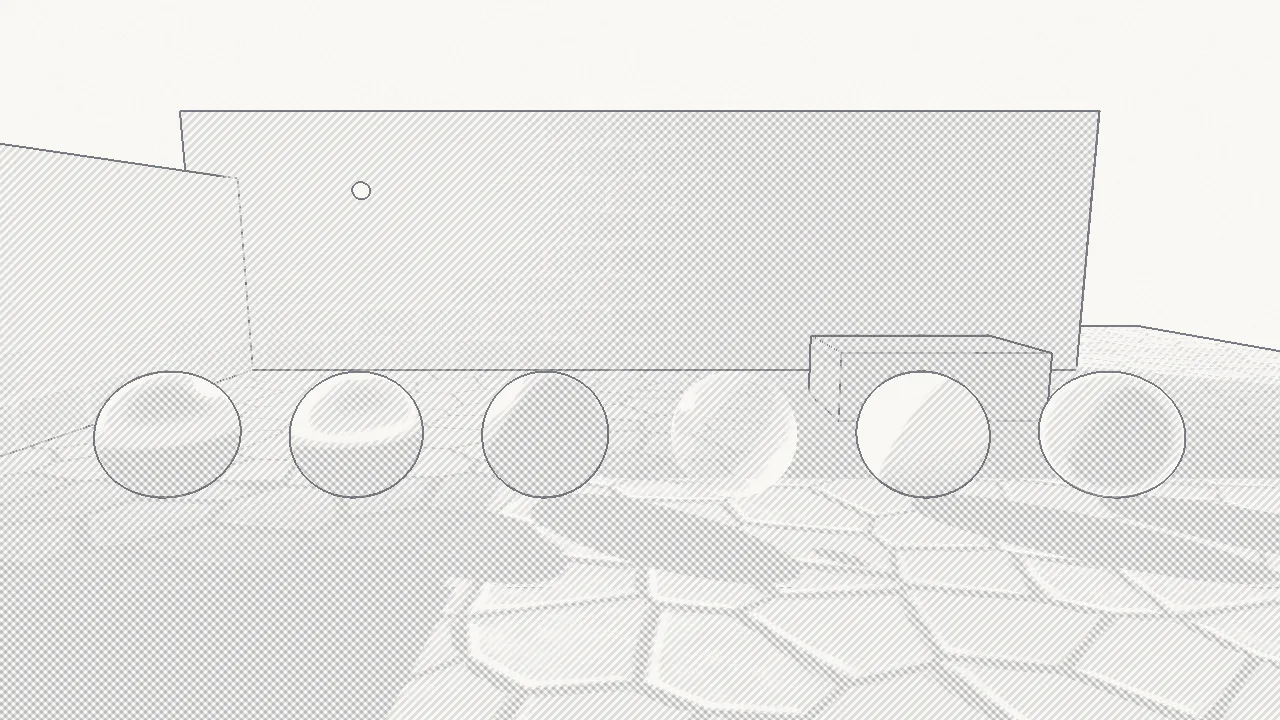
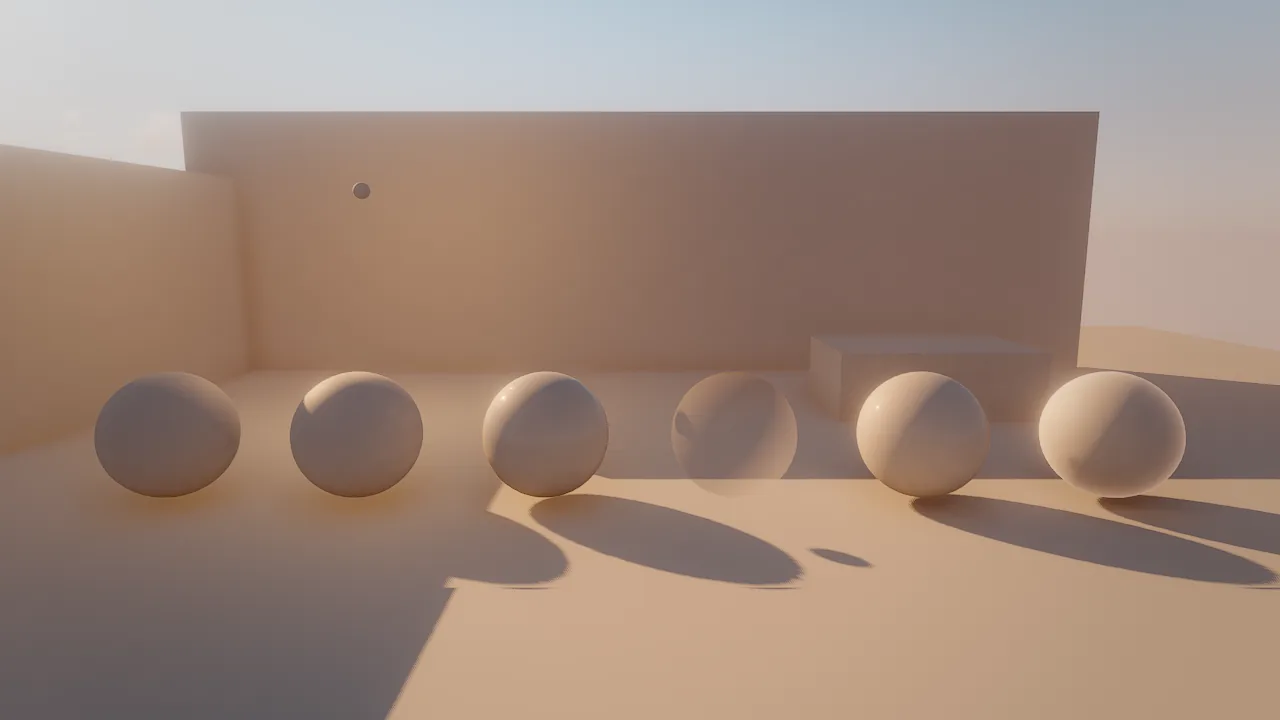
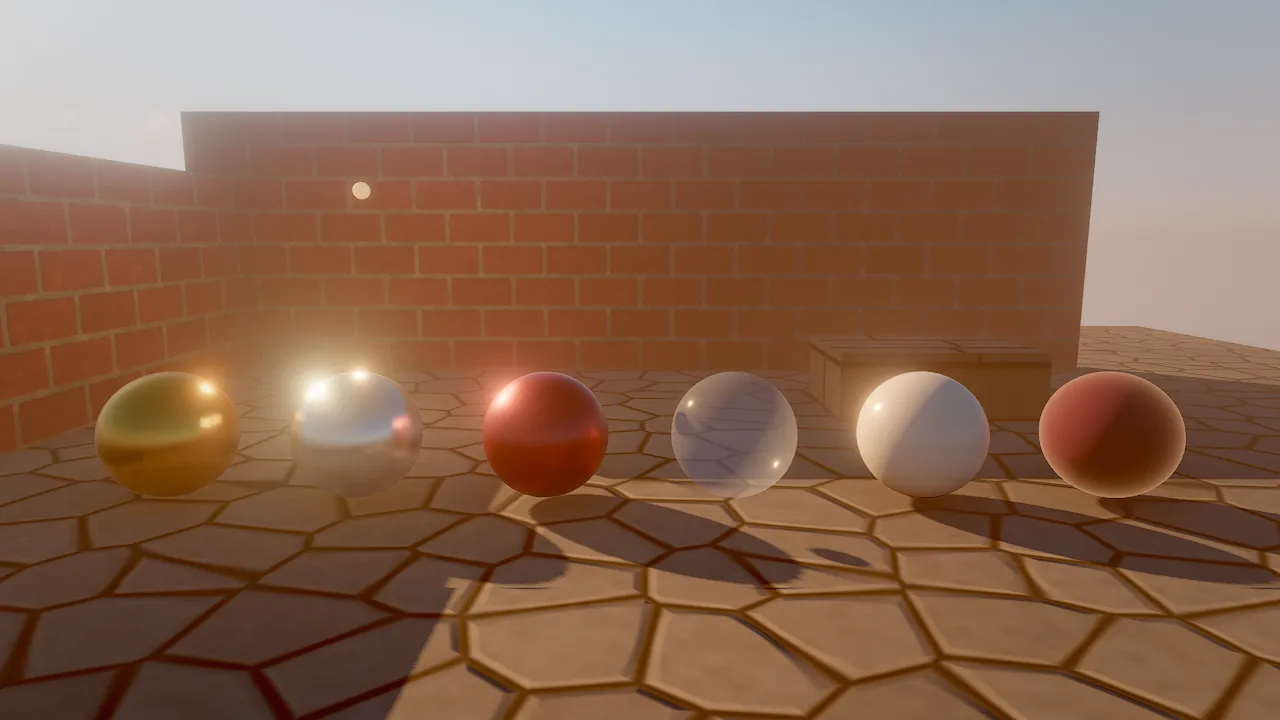
The three looks of one frame of the look-development courtyard: debug_view: "sketch", clay: true and the final
image. A movie rendered three times with the same camera move lines up frame for frame, so you can cut between them.
Outputs and codecs
Pass output (one path) or outputs (several, from one render). The extension picks the codec; codec overrides it
for output, and items of outputs may be {path, codec, bitrate_mbps}.
| Path | Codec | Notes |
|---|---|---|
renders/x.mp4 |
H.264 High (h264) |
8-bit 4:2:0, plays everywhere; about 0.3 bit per pixel per frame (1080p24 is capped near 15 Mbit/s) |
renders/x.mp4 with codec: "hevc" |
HEVC Main10 | 10-bit 4:2:0, about two thirds of the H.264 bitrate |
renders/x.mov |
ProRes 422 HQ (prores) |
10-bit 4:2:2 editing master |
renders/x.mov with codec: "prores4444" |
ProRes 4444 | 12-bit 4:4:4 (no alpha yet) |
renders/x/, renders/x_####.png, renders/x/f_%04d.png |
PNG sequence | Absolute frame numbers: frame_0120.png is frame 120 at any range |
Video is encoded natively with AVFoundation and VideoToolbox; there is no external encoder. H.264 is fed 8-bit BGRA,
HEVC and ProRes 16-bit RGB, so accumulated sub-frames keep their extra precision. Files are tagged Rec.709 (primaries,
transfer and matrix). Builds without AVFoundation (other platforms, or -DSKY_WITH_AVFOUNDATION=OFF) render PNG
sequences only and report unsupported_codec for video.
How to render a movie
skywalker movie scenes/main.sky.json --project my_game --sequence Intro \
    -o renders/intro.mp4 --codec hevc -o renders/intro.mov --resolution 1080p --samples 16 --shutter 0.5
Each -o adds an output; --codec and --bitrate apply to the -o before them. A JSON argument takes every
movie_render argument, and the options override it.
Game ▸ Render Movie... (Option+Cmd+M), or the film button on a sequencer's scrub bar, opens a compact form: the source (a sequence, or the scene camera with a duration), the format, the output path, size and frame rate, samples, motion blur (as a shutter angle), the look (Final, Clay, Sketch) and Run the game (scripts, physics). Render starts a background render; the viewport shows the frames as they render, with progress, ETA and Cancel above it.
Long renders
| Feature | How it works |
|---|---|
| Progress | Every finished frame emits a movie-progress engine event (frame, frames, percent, ms per frame, ETA, outputs); the end emits a movie-finished event with the summary. The editor shows a progress bar over the viewport; the CLI prints a progress line. |
| Background | background: true returns at once; the engine's update loop then renders one sub-frame per editor frame, so the editor stays responsive and agents keep working. movie_render {"action": "status"} reports progress or the last summary. |
| Cancel | movie_render {"action": "cancel"}, the editor's Cancel button or Ctrl-C in the CLI stop after the current sub-frame. Written PNG frames stay; a video is finished as a valid, shorter file. |
| Resume | resume: true (PNG sequences only) continues at the first missing frame. Frames are written to a temporary file and renamed, so an interrupted render never leaves a truncated frame, and the simulation pre-rolls to the resume point. |
| Summary | State, frames, size, fps, duration, camera, shutter, sample split, elapsed time, average ms per frame and the output paths. |
movie_render {"sequence": "sequences/trailer.sequence.json", "output": "renders/trailer/frame_####.png", "resolution": "4k", "samples": 32, "background": true}
movie_render {"action": "status"}
movie_render {"action": "cancel"}
movie_render {"sequence": "sequences/trailer.sequence.json", "output": "renders/trailer/frame_####.png", "resolution": "4k", "samples": 32, "resume": true}
Sub-frame time and determinism
The simulation keeps its fixed 1/60 s tick during a movie render. A finer tick would make scripts and physics diverge from the game being recorded. Instead, a sub-frame at movie time τ runs the simulation to the first tick at or after τ and shows the state between that tick and the previous one:
- Transforms are interpolated between the two tick states (position and scale lerp, rotation slerp the short way round). Jumps longer than 25 m in a tick (teleports, respawns) are not smeared. Interpolating local transforms keeps hierarchies such as wheels on cars rigid.
- Sequences (property, camera-cut and shot tracks) are evaluated exactly at τ, so camera moves are smooth curves rather than 60 Hz polylines and cuts land exactly. Event and animation tracks stay with the simulation.
- Inline camera paths are evaluated exactly at τ.
- The effects clock (water waves, sky and clouds, GPU particles, fluids, hair) is set to τ.
- CPU particles move along their velocity from the tick to τ.
Everything is restored right after the sub-frame renders, so the simulation never sees render-time state. This is the
same code real-time frames use for render interpolation, so entities with process.interpolation set to off snap to
ticks in movies too. Cosmetic on frame Wander handlers (camera shake, bobbing) run for every sub-frame with
time = τ and are undone after it.
Determinism. Renders start from the canonical scene (its saved JSON form, which is also what every play session restores), seed the simulation the same way and step it identically. Two renders of the same clip produce identical frames on the CPU renderer (tested), and range or resumed renders match full ones. GPU renders are deterministic up to the GPU's own floating point (parallel reductions in exposure metering and simulations).
Cuts and exposure
Offline frames are independent accumulations: no temporal anti-aliasing history, even with one sample per sub-frame, and no post-process camera motion blur (the real shutter replaces it). Auto exposure adapts by the movie's frame time at the scene's adaptation speed, moving continuously without pumping. The first frame and every cut re-meter exposure and drop temporal history, so a cut never ghosts or inherits the previous shot's exposure.
Cuts are known in advance: from sequences (camera-cut keys and shot starts where the shown camera or shot actually changes, and each loop wrap) and from inline shot lists. Sub-frames never straddle a cut: a frame's shutter is clamped to its own shot. In scene-camera renders, a change of the primary camera counts as a cut.
GPU safety
Each sub-frame holds the machine-wide GPU job lock (~/.skywalker/gpu.lock) for that sub-frame only, so renders from
several processes interleave instead of stacking up. The renderer commits one command buffer per accumulated sample:
no clip, frame or sub-frame ever becomes a single long GPU job that could trip the system watchdog.
If a frame faults on the GPU (a watchdog timeout or a page fault), readback reports gpu_error and the renderer switches
to safe mode. The movie then renders that whole frame again once with half the spatial samples, and stops with
failed and the error if it faults again. A faulted frame is never written; the summary counts retries in
gpu_retries.
Performance
Measured on an M1 Pro with the smugglers_cove example (HDRI sky, FFT ocean, volumetric campfire, embers, two ships,
simulate: true), at 1920×1080, 24 fps, 4 s, samples: 8, shutter: 0.5 (8 sub-frames per frame), with HEVC and
ProRes outputs written from one render: about 230 ms per frame, 30–45 s for the clip including loading. Clay and
sketch versions of the same move cost the same.
Each spatial sample is a render of the frame, so render time grows with samples, the frame count and the resolution.
For a quick preview, render at 720p with samples: 2 and
quality: "fast"; raise samples only for the final pass.
Recipe: preview, then final
movie_render {"sequence": "sequences/establishing.sequence.json", "output": "renders/establishing_preview.mp4", "resolution": "720p", "samples": 2, "quality": "fast"}
movie_render {"sequence": "sequences/establishing.sequence.json", "outputs": ["renders/establishing.mp4", {"path": "renders/establishing.mov", "codec": "prores"}], "resolution": "1080p", "samples": 16, "shutter": 0.5, "simulate": true}
movie_render {"sequence": "sequences/establishing.sequence.json", "output": "renders/establishing_clay.mp4", "resolution": "1080p", "samples": 16, "shutter": 0.5, "clay": true}
The same from the command line, for the Tidebreak Isle example:
skywalker movie examples/tidebreak_isle/scenes/main.sky.json --project examples/tidebreak_isle \
    --sequence sequences/establishing.sequence.json -o ~/Movies/establishing.mp4 --resolution 1080p --samples 16 --shutter 0.5
Pitfalls
- Skinned characters are posed at 60 Hz. Within one shutter interval at 24 fps their pose changes at most twice, so very fast limbs blur in two steps.
- Sub-frames are accumulated after tone mapping, so very bright highlights streak a little dimmer than an accumulation in high dynamic range would.
- No alpha channel (ProRes 4444 is encoded opaque) and no audio track.
- Film grain changes per sub-frame and averages out under motion blur.
- A frame retried after a GPU fault is rendered at the simulation state reached so far, which can be up to one tick late for its earliest sub-frames.
- Video needs AVFoundation. Builds without it write PNG sequences only.
For agents
Preview cheaply, look at a frame, then render the final in the background and poll it:
sequence_get {"sequence": "Intro"}                                 # tracks and length
sequence_scrub {"sequence": "Intro", "times": [0, 2, 4, 6]}        # a storyboard of the cut before rendering
movie_render {"sequence": "Intro", "output": "renders/intro_preview.mp4", "resolution": "720p", "samples": 2, "quality": "fast"}
movie_render {"sequence": "Intro", "output": "renders/intro.mp4", "samples": 16, "shutter": 0.5, "background": true}
movie_render {"action": "status"}                                  # progress, ETA, then the summary
Never start two heavy renders at once on one machine: the GPU lock serializes them anyway, and a long queue blocks the editor's own frames.
Reference
- Tools:
movie_render - CLI:
skywalker movie - Components:
sequencer - Animation for sequences and camera shots, Simulation and time for render interpolation
- Design document: docs/MOVIE_RENDER.md