Materials
A surface's look comes from the fields of its mesh component or, when mesh.material is set, from a reusable
material asset (.mat.json) with the same fields. Surfaces are physically based by default (metal/roughness PBR with
image-based light), and the same fields drive stylized looks: toon bands, rim light, cartoon outlines and flat unlit
color. Built-in presets and a procedural PBR texture generator give you good starting points without any image files.
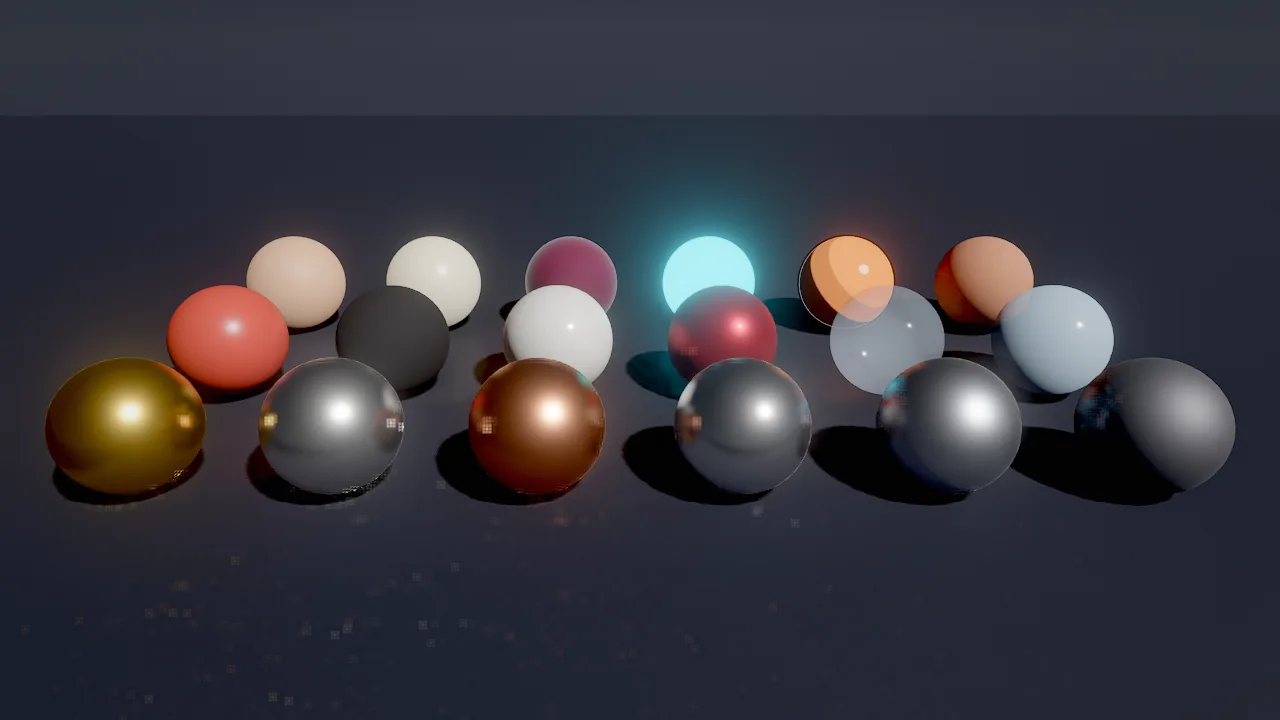
material_create. Front row: gold, silver, copper, chrome, brushed_steel, iron. Middle: plastic, rubber, ceramic, car_paint, glass, ice. Back: skin, wax, velvet, neon, toon, clay.Concepts
Shading models
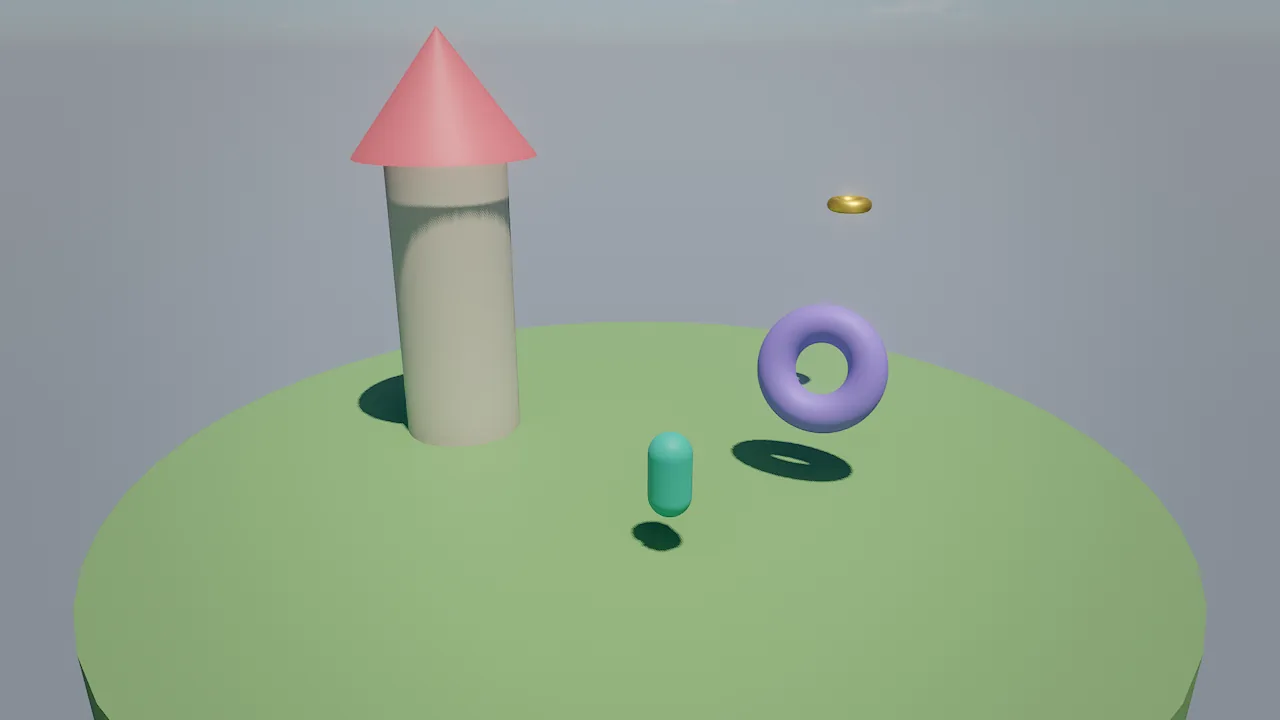
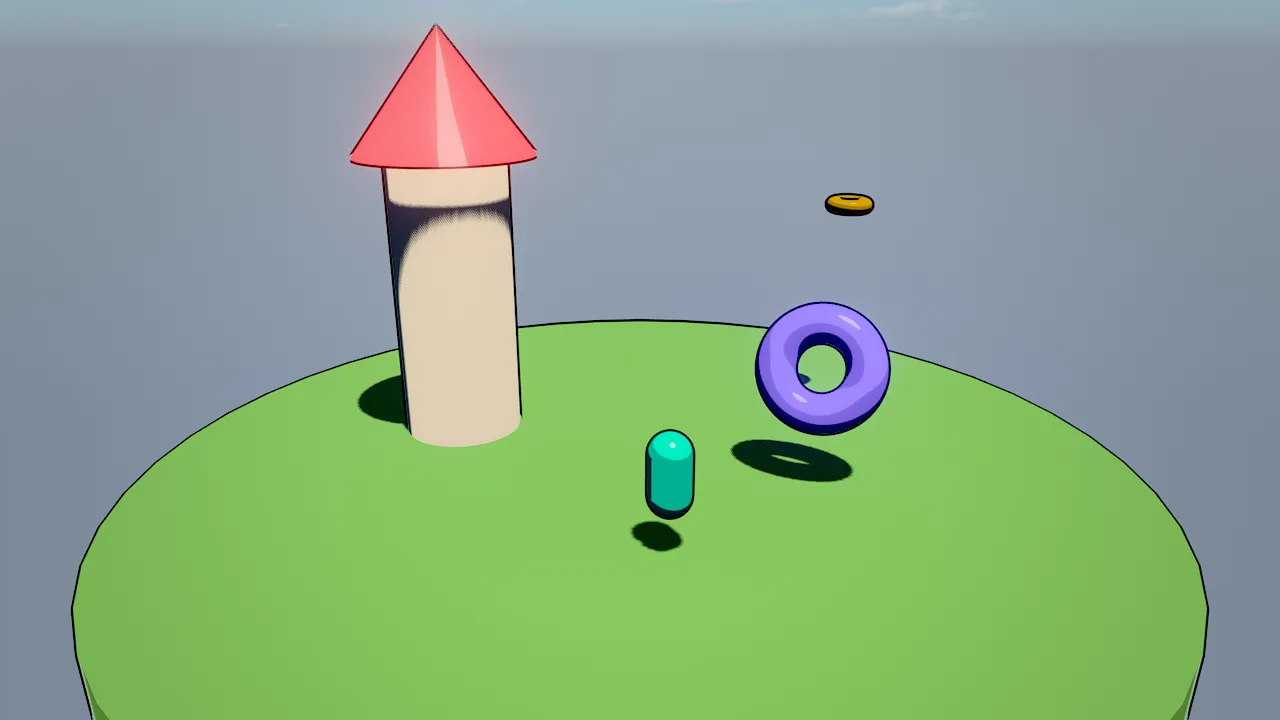
shading selects how a surface responds to light:
shading |
Look | Use for |
|---|---|---|
pbr (default) |
Metal/roughness PBR: GGX specular with height-correlated Smith visibility, Lambert diffuse, split-sum image-based light, screen-space GI and reflections | Realistic surfaces |
toon |
Banded light, a crisp highlight and a hemispheric fill | Cartoon and cel-shaded games |
unlit |
The color or texture as is, without lighting or shadows | 2D, UI, signs, stylized neon |
water |
Animated waves on a large plane; color is the deep water tint |
Simple water on a plane (the water component is the full ocean) |
Toon and unlit surfaces keep their stylized lighting: screen-space GI and reflections replace the probe light of PBR surfaces only.
Surface fields
These fields exist on the mesh component and on material assets:
| Field | Range | Meaning |
|---|---|---|
color |
color | Base color (sRGB), multiplied with texture. An alpha below 1 makes the surface transparent. |
metallic |
0..1 | 0 = dielectric, 1 = metal |
roughness |
0.02..1 | 0.02 = mirror, 1 = matte |
emissive |
color | Emitted light; the alpha channel is the strength and can exceed 1 (HDR), which glows with bloom |
texture |
path | Base color map (png/jpg), project-relative |
normalMap |
path | Tangent-space normal map, OpenGL convention. The tangent frame comes from screen-space derivatives, so meshes need no tangents. |
normalStrength |
0..4 | Normal map strength |
ormMap |
path | glTF packing: R = occlusion, G = roughness, B = metallic; each channel multiplies the scalar field |
emissiveMap |
path | Multiplies emissive |
tiling |
0.01..1000 | Texture repeats; with triplanar, repeats per meter of world space (tilingU / tilingV on material assets) |
triplanar |
bool | World-space projection with normal blending: textures never stretch on scaled cubes, walls or terrain |
clearcoat |
0..1 | A second glossy lobe on top: car paint, varnish, ceramics |
subsurface |
0..1 | Wrapped diffuse plus back-light transmission: skin, leaves, wax, snow, ice |
rim |
0..4 | Stylized light along silhouettes |
outline |
0..12 | Cartoon outline width in pixels (an inverted hull with constant screen-space width); outlineColor sets its color |
doubleSided |
bool | Render both faces: leaves, cloth, cards |
castShadows |
bool | Cast sun shadows (default on; mesh only) |
alphaCutoff |
0..1 | Alpha-tested cutout: texture alpha below this is cut (foliage, fences, sails); 0 = off |
unlit |
bool | Flat color or texture without lighting |
Material assets add occlusionStrength (0..1, the ORM map's ambient occlusion) and separate tilingU / tilingV.
The mesh component also has mesh, visible, billboard, material and layers (see
Render layers).
Roughness is widened automatically where normals vary within a pixel (specular anti-aliasing), so detailed normal maps do not sparkle in motion.
Transparency
A color alpha below 1 makes a surface transparent: glass, ghosts, light shafts. Transparent surfaces are sorted
back to front, drawn after opaque ones, and do not cast shadows. For hard-edged cutouts (leaves, chain-link fences,
torn sails) use alphaCutoff instead: alpha-tested surfaces stay opaque, sort correctly and cast shadows.
Emissive light and bloom
emissive is [r, g, b, strength] or "#rrggbbaa", where the alpha byte is the strength from 0 to 1; use the
array form for strengths above 1. Those are HDR and glow through the bloom chain; how much depends on the environment's bloomThreshold and bloomIntensity.
Emissive surfaces also light their surroundings through screen-space GI when they are on screen (see
GI and reflections), but they are not light sources for the clustered lighting; add a light where a lamp
must light things off screen.
Material assets and presets
A material asset is a .mat.json file with "format": "skywalker.material". When an entity's mesh.material points
at it, the material overrides the entity's inline color, PBR values, emissive and texture. Editing a material updates
every entity that uses it instantly.
material_create starts from a preset; any field you pass overrides it:
| Preset | Base values |
|---|---|
gold, silver, copper, chrome, brushed_steel |
Metals: metallic 1, roughness 0.04 (chrome) to 0.38 (brushed steel) |
iron |
metallic 0.9, roughness 0.62 |
plastic, rubber |
Dielectrics: roughness 0.32 and 0.92 |
ceramic |
roughness 0.12, clearcoat 0.6 |
car_paint |
Red, metallic 0.6, roughness 0.38, clearcoat 1 |
glass |
Pale blue at about 22% alpha, roughness 0.03, double-sided |
water |
shading: water, deep teal |
ice, skin, wax, snow |
subsurface 0.5 to 0.9 |
leaves |
Green, subsurface 0.6, double-sided |
velvet |
roughness 0.85, rim 1.2 |
neon |
Black, cyan emissive at strength 4, unlit |
toon, toon_metal |
shading: toon, rim 0.6 / 0.8, outline 2 |
clay |
Terracotta, roughness 0.95 |
material_create {"path": "materials/car_body.mat.json", "preset": "car_paint", "color": "#1d4fa8"}
material_assign {"entities": ["Kart Body"], "material": "materials/car_body.mat.json"}
material_update {"path": "materials/car_body.mat.json", "clearcoat": 0.8}
asset_preview {"asset": "materials/car_body.mat.json"}
Scripts write the entity, not the asset
self.mesh.emissive changes the entity's own field. When the entity uses a material asset, the asset's values win
for color, PBR values, emissive and texture; flash an entity that has no material, or clear it first.
Generated PBR textures
texture_generate writes a seamless albedo, normal and ORM set (<name>_albedo.png, _normal.png, _orm.png) and,
by default, a triplanar material materials/<last part of name>.mat.json that uses them, at 0.5 repeats per meter.
Provenance (generator: texgen, kind, seed) is stored in each file's .meta.
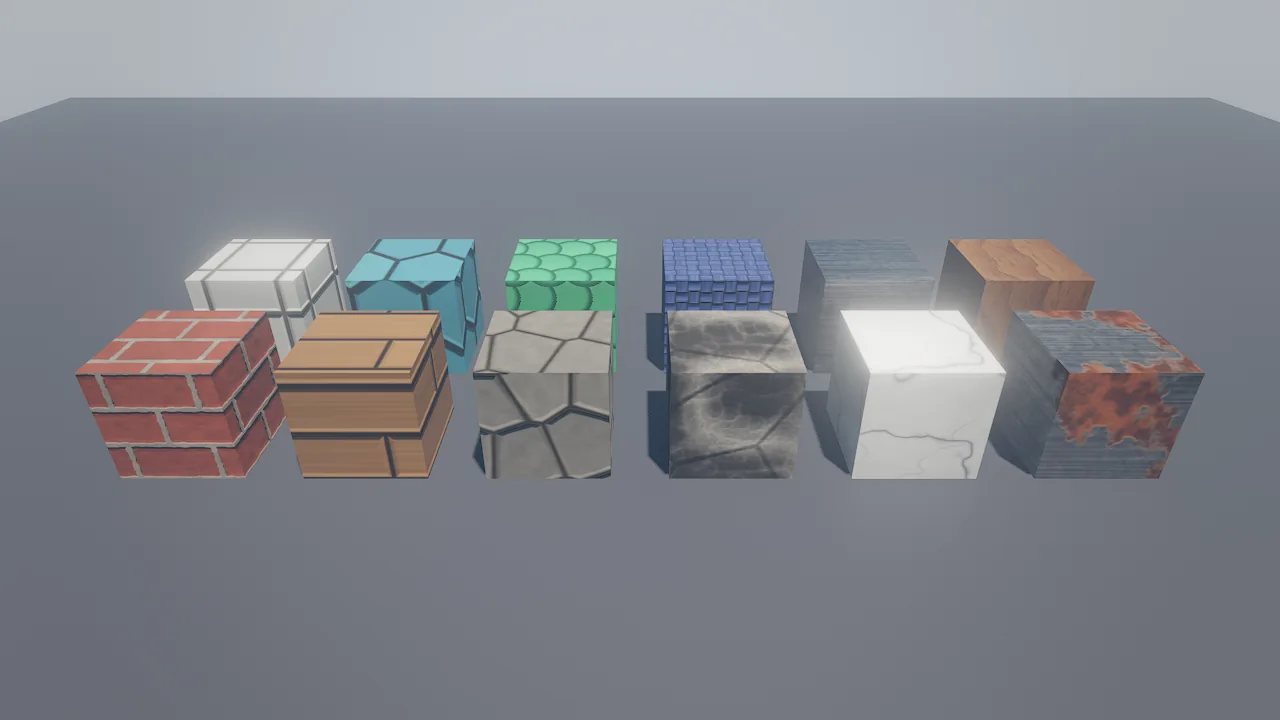
texture_generate kinds on cubes. Front row: bricks, planks, cobblestone, rock, marble, rust. Back row: tiles, hexagons, scales, fabric, metal_brushed, wood.| Group | Kinds |
|---|---|
| Masonry and floors | bricks, tiles, cobblestone, hexagons, planks, checker, stripes |
| Natural | rock, marble, wood, grass, dirt, sand, noise, scales |
| Manufactured | metal_brushed, rust, fabric |
| Stylized | stylized |
| Soft effect textures | glow (radial), curtain (vertical rays fading upward): transparent edges and a self-lit, double-sided material for light pools, auroras, shafts and steam |
Customize with color1 (primary), color2 (secondary), color3 (mortar, grout, veins, rust), scale (feature
count), variation, bump, roughness, metallic, seed and size (64 to 2048 pixels, power of two).
texture_generate {"kind": "bricks", "name": "textures/old_bricks", "color1": "#9a4a3a", "color3": "#c8bfae", "seed": 4, "size": 1024}
material_assign {"entities": ["Wall North", "Wall East"], "material": "materials/old_bricks.mat.json"}
viewport_capture {"debug_view": "texel_density", "samples": 1}
Imported materials
Importing a glTF or GLB model extracts base color, metallic-roughness (with packed occlusion), normal and emissive
maps, alpha mask or blend and double-sidedness into material assets next to the mesh. OBJ files bring their first
.mtl material. See Assets and prefabs.
Recipes
| Look | Settings |
|---|---|
| Photoreal stone and metal | texture_generate kinds with their triplanar materials; metals from presets with roughness 0.2 to 0.4; environment tonemap: agx, ao: 1 |
| Cartoon | shading: toon, outline 2 to 3, rim 0.5, saturated colors; environment tonemap: neutral, saturation: 1.2 |
| Neon sign | neon preset or unlit with emissive strength 2 to 5 on a dark glossy floor (roughness: 0.3); bloomIntensity: 0.8 |
| Wet street | roughness 0.1 to 0.2 on the ground with ssr: 1, so lamps and signs reflect |
| Pixel-art 2D | shading: unlit, an orthographic camera, tonemap: none, bloom off |
| Foliage card | Texture with alpha, alphaCutoff: 0.5, doubleSided: true, subsurface: 0.5 |
Recipe: a toon look in four calls
material_create {"path": "materials/hero_toon.mat.json", "preset": "toon", "color": "#2ec4b6", "outline": 2.5, "rim": 0.4}
material_assign {"entities": ["Hero"], "material": "materials/hero_toon.mat.json"}
environment_update {"tonemap": "neutral", "saturation": 1.2, "bloomIntensity": 0.3}
viewport_capture {"samples": 8}
Pitfalls
- Material wins. With
mesh.materialset, inlinecolor,metallic,roughness,emissiveandtextureare ignored. Change the material, or clearmaterialwithmaterial_assign {"entities": [...], "material": ""}. - Transparent surfaces do not refract and cast no shadow. Water refracts; glass does not yet.
- Normal maps use the OpenGL convention (green up). Maps authored for the other convention look inverted; flip their green channel.
- Triplanar tiling is per meter. A triplanar material with
tiling0.5 repeats every 2 m regardless of the mesh's scale; checktexel_densityin debug views. - Emissive is not a light. Glowing surfaces light the scene only through on-screen GI.
For agents
Prefer presets and generated textures to guessing numbers, and look at the result:
material_create {"path": "materials/stone.mat.json", "preset": "clay", "roughness": 0.9}   # start from a preset
texture_generate {"kind": "rock", "name": "textures/cliff"}                               # PBR maps + triplanar material
asset_preview {"asset": "materials/cliff.mat.json"}                                       # material on a sphere
material_assign {"entities": ["Cliff"], "material": "materials/cliff.mat.json"}
viewport_capture {"samples": 8}
viewport_capture {"debug_view": "material", "samples": 1}                                 # roughness red, metallic green
Reference
- Tools:
material_create,material_update,material_assign,texture_generate,asset_preview - Component:
mesh - Design: docs/RENDERING.md (Surfaces; Materials and textures for agents), docs/ASSETS.md