Terrain
A terrain is a large heightfield on one entity: an island, a coastline, an alpine range, a canyon, dunes or a whole continent from your own heightmap. Skywalker generates the relief with noise and erosion, paints up to eight material layers from height and slope rules, renders it with continuous level of detail, and gives it a matching physics heightfield. You build it with terrain_create, shape it with brushes, and query it so that everything you place afterwards sits on real ground.
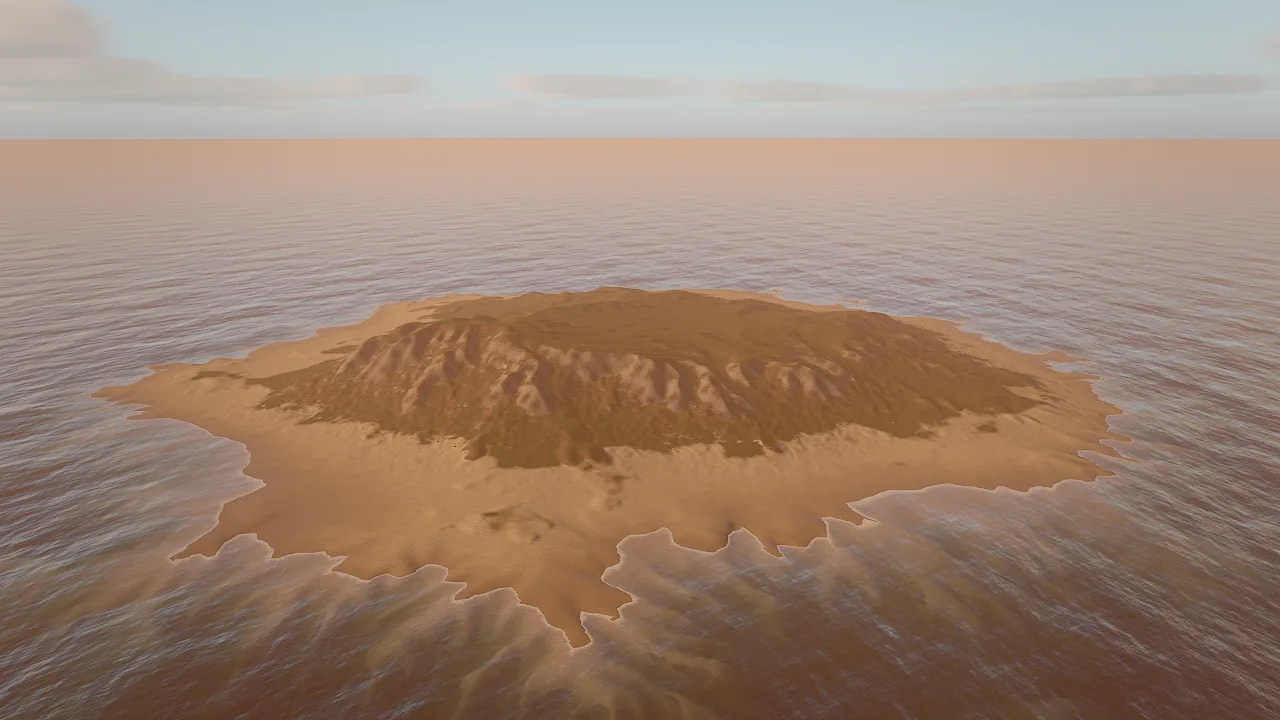
island_beach preset with water: true: eroded ridges, a sand shelf auto-painted near sea level, and a calm FFT sea with a wet shoreline.Concepts
The terrain component
A terrain is a square grid of resolution² height samples that covers size × size meters, centred on the entity. Heights are stored relative to the entity, so moving the entity moves the whole landscape. The samples and the per-sample layer weights live in a binary .terrain file under the project; the component keeps everything needed to rebuild that file.
| Field | Type | What it does |
|---|---|---|
data |
string | Project-relative .terrain file with heights and layer weights. It is a cache (see below). |
size |
number, 8–32768 | Square extent in meters. Default 512. |
resolution |
integer | Height samples per side, 2ⁿ+1: 257, 513 (default), 1025, 2049. |
generator |
object | Generation parameters: shape, seed, minHeight, maxHeight, featureSize, ridges, warp, erosion, thermal, terraces, beachWidth, seaLevel; for shape heightmap also heightmap and detailNoise. |
layers |
array | Up to 8 material layers, base first, each with paint rules. |
edits |
array | Hand edits recorded by terrain_sculpt, terrain_paint and terrain_layers, replayed in order over the generator when the cache is rebuilt. Cleared by terrain_generate. |
waterLevel |
number | World height of the water line. Sand and soil just above it render wet. |
wetBand |
number, 0–20 | Meters above the water line that stay damp. Default 1.2. |
detail |
number, 0.25–4 | Level-of-detail quality multiplier (0.5 faster, 2 sharper). |
macroVariation |
number, 0–1 | Large-scale tone and hue variation across the landscape; breaks up layer tiling. 0 = off, 0.5 natural. |
castShadows |
bool | Casts sun shadows. |
overlay |
string | Image draped over the whole terrain (political maps, borders, paper maps). |
overlayOpacity |
number, 0–1 | Overlay strength, multiplied by the image alpha. |
overlayBlend |
enum | mix, multiply or glow (see Map overlay). |
The .terrain file is a cache
Generation is deterministic: the same generator and seed always produce the same heights. When the .terrain file is missing, the engine regenerates it from the generator, repaints the layers from their rules and replays the recorded edits, so sculpting and painting survive. You can leave large terrain binaries out of version control.
Generation
The generator builds the relief in three stages:
- Shape. Warped fractal noise (
featureSizemeters between large features,warpfor natural, less noisy forms,ridgesblending toward sharp ridged crests,terracesfor stepped strata) shaped by the preset'sshape:hills,mountains,island,coast,canyon,dunes,plains,valleyorheightmap. - Erosion. Deterministic hydraulic droplet erosion (
erosion, 0–1) carves gullies and fans; thermal erosion (thermal, 0–1) relaxes slopes into scree. - Paint. Each layer's rules (height, slope, noise) compute its weight at every sample. Later layers paint over earlier ones where their rules match.
Heights are absolute meters between minHeight and maxHeight (negative values lie below the entity, for a seabed). Island and coast shapes add a gentle shelf beachWidth meters wide around seaLevel.
Presets
terrain_create starts from a preset, which sets the generator and a matching layer stack:
| Preset | Shape | Heights (m) | Layers, base first |
|---|---|---|---|
island_beach |
Island with beaches and a seabed; pair with water: true |
−18 to 48 | sand, seabed, grass, soil, rock |
tropical_coast |
Coastline with cliffs and coves | −16 to 70 | sand, seabed, grass, soil, rock |
alpine |
Ridged peaks, scree, snow above about 260 m | 0 to 420 | grass, scree, rock, snow |
mountain_valley |
A valley between ranges, snow above about 190 m | 0 to 260 | grass, scree, rock, snow |
canyon |
Terraced canyon walls | 0 to 140 | dust, gravel, cliff |
desert_dunes |
Wind-shaped dunes, no hydraulic erosion | 0 to 26 | sand, crust |
rolling_hills |
Gentle pasture and farmland | 0 to 45 | grass, soil, rock |
flat |
Level ground for tests and arenas | 0 to 2 | grass, soil, rock |
Every seed gives a different landscape with the same character. Rock layers on steep slopes use triplanar projection, so cliffs do not stretch.
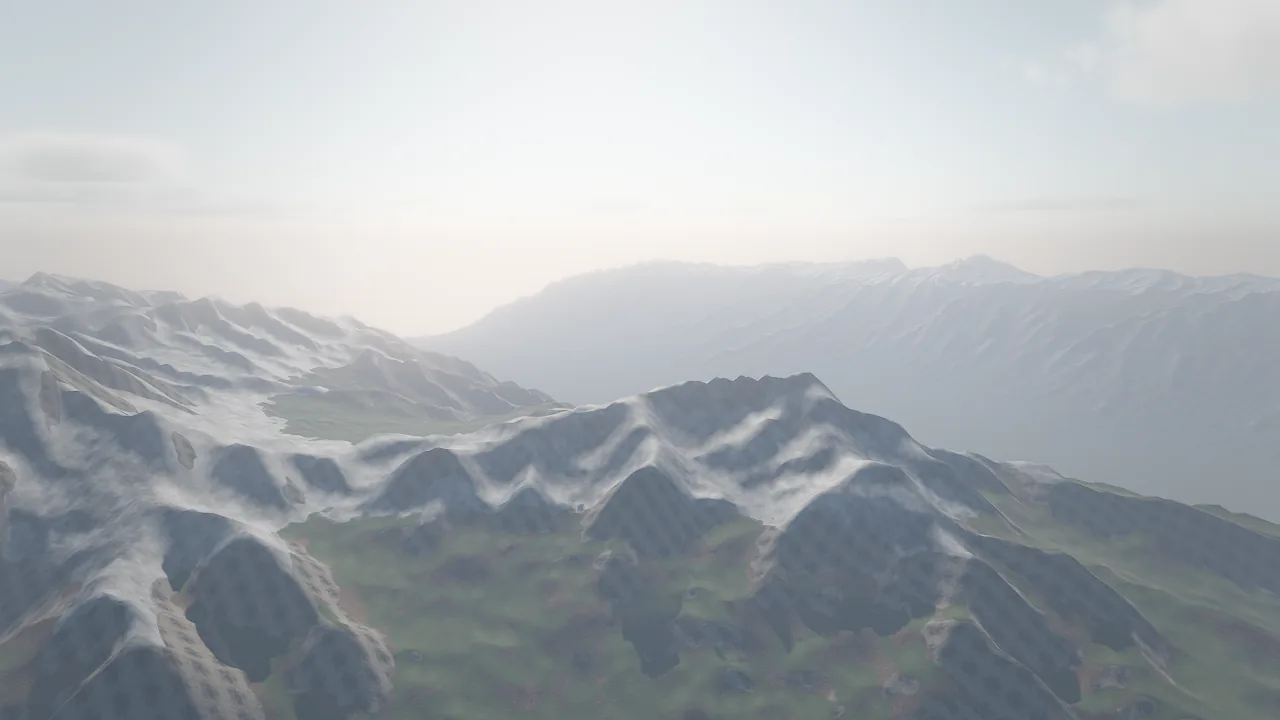
mountain_valley: snow on the ridges, scree and rock on steep faces, grass in the valley
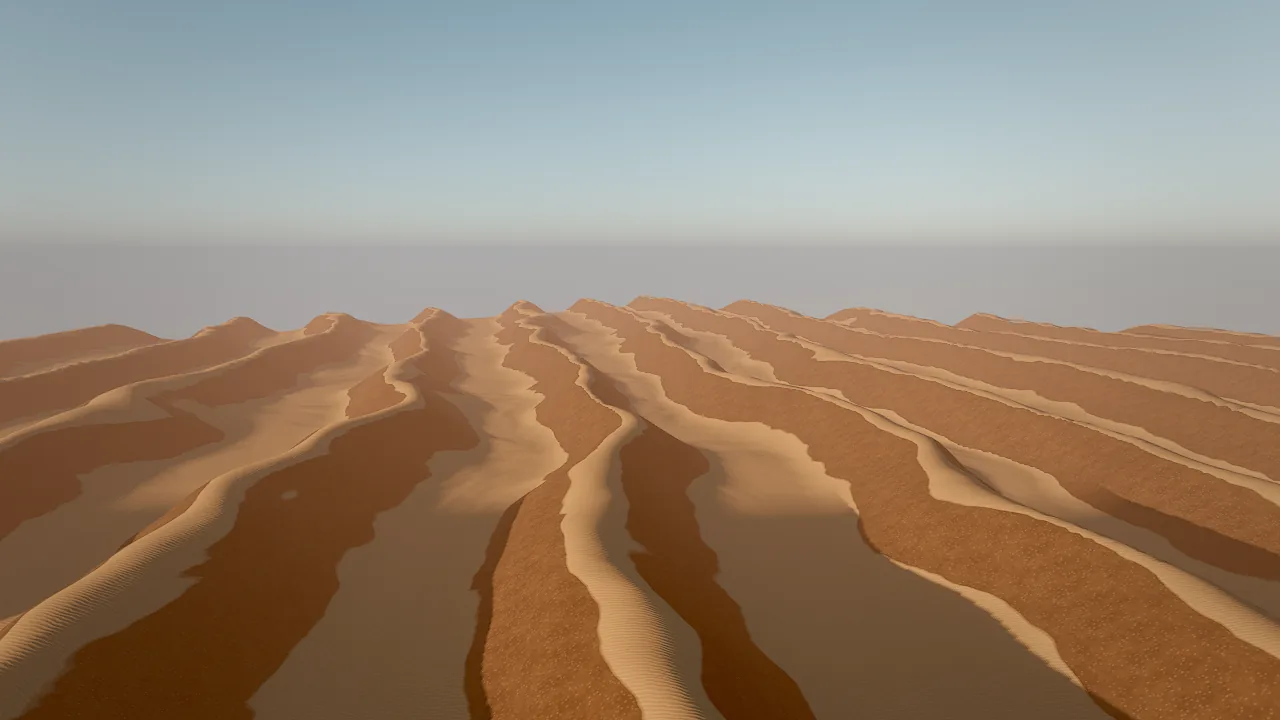
desert_dunes: sand on the crests, crust on the steeper flanks
Rendering
The renderer does not build a mesh for the terrain. It displaces a shared grid from a height texture with CDLOD (continuous distance-dependent level of detail): a quadtree selects 32×32-vertex patches, and vertices morph between levels, so there are no cracks between patches and no popping as the camera moves. A kilometer-scale terrain therefore costs a few textures, not a mesh. detail scales the level-of-detail quality.
Layers blend by their painted weights, sharpened by a height blend: each layer's height (derived from its albedo and ambient occlusion) competes with its weight, so sand settles between stones instead of cross-fading. Terrain casts and receives sun shadows like any other surface.
Material layers
Each layer is an object in layers (at most 8). The base layer covers everything; later layers paint over it where their rules match.
| Layer field | Meaning |
|---|---|
name |
Name used by terrain_paint and in query results. |
texgen |
Generate a seamless procedural set: sand, grass, dirt, rock or noise. Written once per project to textures/terrain/. |
texture, normalMap, ormMap |
Your own maps (project paths), for example downloaded photoscans. |
material |
A material asset whose surface the layer uses. |
color |
Tint ("#rrggbb"); white keeps the texture's colour. |
roughness, metallic, normalStrength |
Surface overrides. |
tiling |
Meters per texture repeat (default 4). |
triplanar |
Project in world space; use it for cliffs. |
heightMin, heightMax |
World-height band where the layer applies. |
slopeMin, slopeMax |
Slope band in degrees. |
noise |
0–1 breakup of the edge, so bands do not look ruled. |
sharpness |
0–1 hardness of the transition. |
Wet shorelines
When waterLevel is set, sand and soil darken and turn glossy from the water line up to wetBand meters above it, which sells swash running up a beach. terrain_create with water: true sets waterLevel to the sea level and wetBand to 1.4 for you. If you add water by hand, set both fields yourself.
Map overlay
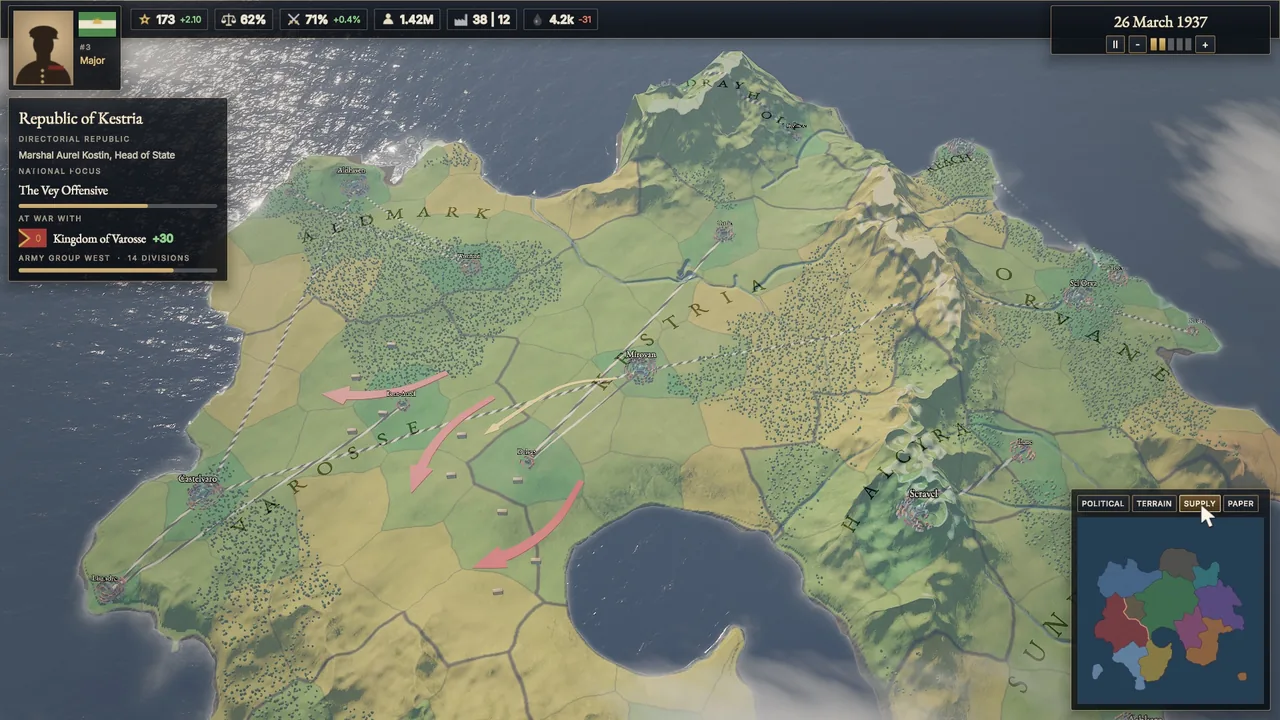
overlay drapes one image over the whole terrain. Row 0 of the image is the −Z edge and column 0 the −X edge; the image alpha masks it. Use it for political maps, region tints, supply networks, borders or a parchment look.
overlayBlend |
Effect |
|---|---|
mix |
Paints over the ground, matte; the relief still shades it. |
multiply |
Tints the ground; textures show through. |
glow |
Adds the colour unlit; reads at night and suits highlights and borders. |
Swap the image or the opacity at run time to implement map modes. Images that scripts choose at run time must be shipped with the game: list them under include in game.json (see Shipping).
Physics
Every terrain the tools create or edit gets a matching static collider with shape heightfield, read from a 16-bit .r16 file written next to the .terrain file. Characters walk on it, bodies land on it and raycast hits it. The collider grid is capped at 1024 cells per side; it is regenerated after each sculpt.
How to create a terrain
The result names the entity, the data file and statistics (resolution, cell size, minimum and maximum height). With water: true it also returns the id of the Sea entity it created.
Choose resolution by size: 257 is plenty for a 200 m island, 513 for 500 m, 1025 for one kilometer or more. Higher resolutions cost memory and generation time.
Tune the generator
Pass generator overrides on creation, or re-roll an existing terrain in place:
terrain_create {"preset": "rolling_hills", "size": 800, "generator": {"maxHeight": 70, "featureSize": 250, "ridges": 0.3, "erosion": 0.7}}
terrain_generate {"entity": "Terrain", "seed": 42, "generator": {"thermal": 0.6, "terraces": 0.2}}
Warning
terrain_generate regenerates the heights, repaints every layer from its rules and clears the recorded edits. Sculpt and paint after you are happy with the generated shape.
Import a heightmap
Build the relief from your own image: a 16-bit grayscale PNG for smooth slopes, an 8-bit PNG, or a square little-endian .r16 file. Values 0..1 map to generator.minHeight..maxHeight; row 0 is the −Z edge.
terrain_create {"heightmap": "maps/continent.png", "size": 4000, "resolution": 2049, "generator": {"minHeight": -40, "maxHeight": 160, "detailNoise": 1.5}}
Without a preset, a heightmap terrain uses heights 0..100, light erosion (0.2) and thermal smoothing (0.1). detailNoise adds that many meters of fractal detail on top of the image; erosion and thermal still apply. The generator keeps the image path, so the .terrain cache is rebuilt from the image when it is missing.
How to sculpt, paint and undo
terrain_sculpt applies brush strokes at world (x, z) positions, in order. Each stroke is {x, z, radius, strength, mode, target, falloff}:
mode |
Effect | strength |
|---|---|---|
raise, lower |
Push the ground up or down | meters |
flatten |
Pull toward the world height target: building pads, plazas, roads |
0..1, fraction of the way per stroke |
smooth |
Soften the surface; blend the edges of other strokes | 0..1 |
noise |
Roughen the ground | meters |
set |
Set the ground to the world height target |
not used |
falloff (0..1) controls how softly the brush fades toward its radius.
terrain_sculpt {"entity": "Terrain", "strokes": [{"x": 30, "z": 10, "radius": 14, "strength": 1, "mode": "flatten", "target": 4.0}, {"x": 30, "z": 10, "radius": 22, "strength": 0.5, "mode": "smooth"}, {"x": -20, "z": 0, "radius": 9, "strength": 1.5, "mode": "lower"}]}
terrain_paint {"entity": "Terrain", "layer": "sand", "strokes": [{"x": 30, "z": 10, "radius": 6, "strength": 1, "falloff": 0.6}]}
terrain_undo {"entity": "Terrain"}
terrain_paint takes a layer by index (0 = base) or by name, with strength 0..1. terrain_undo steps back the last sculpt, paint, generate or layers call on that terrain; changes to the component's fields (such as wetBand) use the regular undo history.
Replace the layers
terrain_layers swaps the whole layer stack and repaints it from the rules. Hand-painted weights are replaced unless auto_paint is false.
terrain_layers {"entity": "Terrain", "layers": [{"name": "meadow", "texgen": "grass", "tiling": 3}, {"name": "path", "texgen": "dirt", "tiling": 2.5, "slopeMin": 18, "slopeMax": 30, "noise": 0.7, "sharpness": 0.3}, {"name": "cliff", "texture": "textures/cliff.png", "normalMap": "textures/cliff_normal.png", "ormMap": "textures/cliff_orm.png", "tiling": 6, "triplanar": true, "slopeMin": 32, "slopeMax": 90}, {"name": "snow", "texgen": "noise", "color": "#f4f6fa", "heightMin": 240, "slopeMax": 42}]}
Generate seamless PBR sets for your own layers with texture_generate {"kind": "rock", "name": "cliff", "create_material": false}, or point texture at downloaded photoscans.
How to query the ground
Never guess ground height: terrain heights are absolute, and a rolling_hills terrain can sit 20 m above zero.
terrain_query {"points": [[0, 0], [40, 10], [-60, 25]]}
raycast {"origin": [12, 300, -8], "direction": [0, -1, 0]}
terrain_query returns height, normal, slope in degrees and the dominant layer at each point, plus terrain statistics. Use it to find flat ground for a village (slope under 8°), the shoreline (height near waterLevel) or cliffs (slope over 35°). raycast hits the terrain and every other mesh.
To place props on the ground, see place_on_surface (drop entities onto the geometry below) and scatter with "surface": "Terrain" (many copies, land only on the terrain).
Recipe: an island with a beach
A small island with a wet beach, dune grass above the swash, shells at the waterline, grass inland and a flat pad for a hut.
terrain_create {"name": "Island", "preset": "island_beach", "size": 400, "resolution": 513, "seed": 7, "water": true}
terrain_query {"entity": "Island", "points": [[0, 0], [60, 20], [-80, 40], [120, 0]]}
terrain_sculpt {"entity": "Island", "strokes": [{"x": 60, "z": 20, "radius": 12, "strength": 1, "mode": "flatten", "target": 6}, {"x": 60, "z": 20, "radius": 20, "strength": 0.5, "mode": "smooth"}]}
foliage_add {"entity": "Island", "layers": [{"preset": "dune_grass", "heightMin": 1.5, "heightMax": 6}, {"preset": "shells", "heightMax": 1.2}, {"preset": "meadow_grass", "terrainLayer": "grass"}, {"preset": "rocks_small"}]}
entity_update {"entity": "Island", "components": {"terrain": {"wetBand": 1.8, "macroVariation": 0.5}}}
environment_update {"preset": "sunset", "windSpeed": 6, "windDirection": 200}
viewport_capture {"eye": [140, 40, 160], "target": [0, 5, 0], "samples": 8}
terrainLayer names the grass layer of the island_beach stack (sand 0, seabed 1, grass 2, soil 3, rock 4; the index 2 works too), so meadow grass grows only where grass is painted. See Foliage for layer fields and Water for the sea.
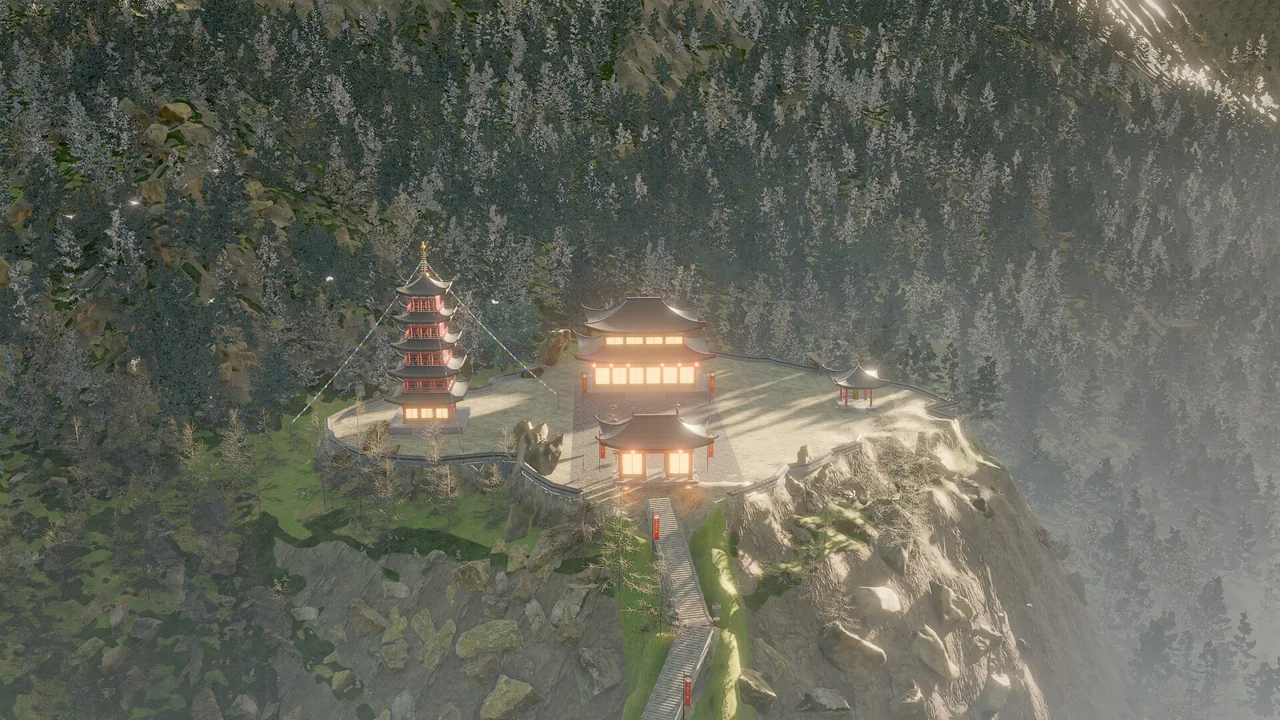
Recipe: a strategy map with map modes
A continent from a heightmap, a political overlay, and buttons that switch map modes at run time.
- Paint (or script) a grayscale
maps/height.pngand several overlay images with alpha:maps/political.png,maps/terrain.png,maps/supply.png. -
Create the terrain and the overlay:
terrain_create {"name": "Continent", "heightmap": "maps/height.png", "size": 2400, "resolution": 2049, "generator": {"minHeight": -16, "maxHeight": 150, "detailNoise": 1}} entity_update {"entity": "Continent", "components": {"terrain": {"overlay": "maps/political.png", "overlayBlend": "mix", "overlayOpacity": 0.92, "macroVariation": 0.4}}} fx_create {"effect": "calm_sea", "position": [0, 0, 0]} entity_update {"entity": "Continent", "components": {"terrain": {"waterLevel": 0, "wetBand": 0.6}}} -
Ship the overlay images by listing them in
game.json: -
Attach a behavior that swaps the overlay when UI buttons named
Political,TerrainandSupplyare used (or keys 1–3 are pressed):behavior MapModes intent "Switch the continent's map overlay between political, terrain and supply views." var mode = "political" fn set_mode(m: string) mode = m let t = find("Continent") if m == "political" then t.terrain.overlay = "maps/political.png" t.terrain.overlayBlend = "mix" t.terrain.overlayOpacity = 0.92 elif m == "terrain" then t.terrain.overlay = "maps/terrain.png" t.terrain.overlayBlend = "multiply" t.terrain.overlayOpacity = 0.85 else t.terrain.overlay = "maps/supply.png" t.terrain.overlayBlend = "glow" t.terrain.overlayOpacity = 0.9 end end on ui "Political" set_mode("political") end on ui "Terrain" set_mode("terrain") end on ui "Supply" set_mode("supply") end on key "1" set_mode("political") end on key "2" set_mode("terrain") end on key "3" set_mode("supply") end end
For map-scale cloud layers seen from above, use a low, thin layer with small features (for example environment_update {"cloudHeight": 330, "cloudThickness": 150, "cloudScale": 0.1}); see Sky and atmosphere. The Meridian Accord example implements this recipe with four modes, a paper map and a minimap.
Pitfalls
- Camera or props under the ground. Heights are absolute world values relative to the entity. A frame that is entirely orange or brown usually means the camera is inside the terrain. Query with
terrain_querybefore you place anything. - Regenerating discards hand work.
terrain_generaterepaints layers and clearsedits. Sculpt and paint last. - Resolution and size. A high
resolutionwith a largesizeis slow to generate. Start at 257 or 513 and raise it only when silhouettes look faceted. - Overlay images in builds. An overlay assigned only from a script is not referenced by the scene; list it under
includeingame.json, or the shipped game shows the ground without it. - Foliage heights are world heights.
heightMinandheightMaxon foliage layers are world y, not relative to the terrain. - Eight layers at most. Extra entries in
layersare ignored.
For agents
Build terrain in this order and verify each step with numbers before you look at pixels:
terrain_create {"preset": "island_beach", "size": 300, "seed": 11, "water": true}   # relief, layers, sea, collider
terrain_query {"points": [[0, 0], [40, 10], [-60, 25]]}                            # real heights and slopes
terrain_sculpt {"entity": "Terrain", "strokes": [{"x": 40, "z": 10, "radius": 12, "strength": 1, "mode": "flatten", "target": 5}]}
foliage_add {"entity": "Terrain", "layers": [{"preset": "dune_grass", "heightMin": 1.5}]}
viewport_multi {}                                                                   # layout from four views
perf_stats {"frames": 30}                                                           # cost of the result
Use terrain_undo for terrain edits, not history. Take target heights for flatten from terrain_query, never from a guess.
Reference
- Tools:
terrain_create,terrain_generate,terrain_sculpt,terrain_paint,terrain_layers,terrain_undo,terrain_query,raycast,place_on_surface,scatter. - Components:
terrain,collider. - Related pages: Water, Foliage, Physics and navigation.
- Design document: docs/RENDERING.md ("Terrain and foliage").