Scenes and entities
A scene is the authoritative state of one level, menu or cutscene: an ordered list of entities, each with a name, a
place in a hierarchy, tags, free-form variables, components and behaviors, plus the scene-wide environment. Scenes
are plain JSON files (.sky.json) that you can read, diff and merge. Every change to a scene, made by you in the
editor, by an agent or by a tool, goes through one validated, undoable and attributed path.
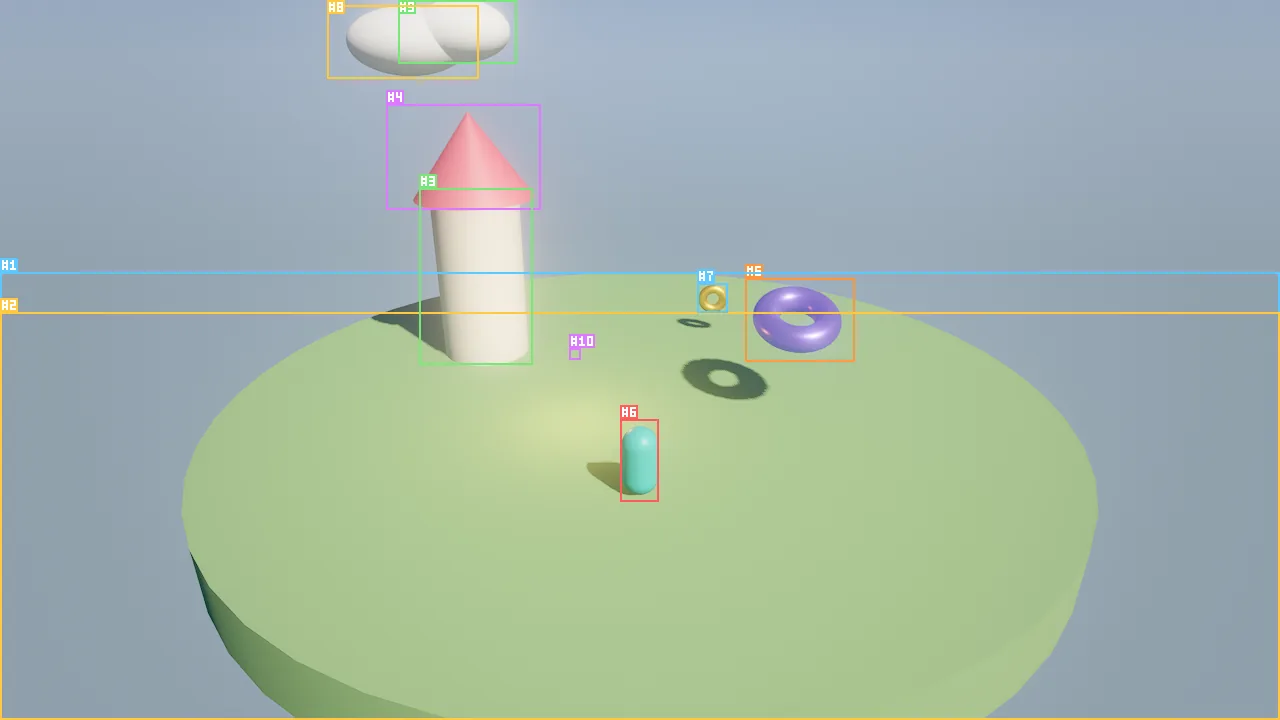
viewport_capture {"annotate": true}: every visible entity carries its stable #id and its screen box.Concepts
Entities
An entity is an id plus a record:
| Part | What it holds |
|---|---|
id |
A stable 64-bit number, written #12 in tool output. Ids are never reused within a scene, so an agent can hold on to #12 across many edits. |
name |
A display name. Names need not be unique; tools accept an id or an exact name. |
parent |
The parent entity id, or 0 for a root entity. |
enabled |
A disabled entity, and everything under it, is not drawn and runs nothing. |
tags |
A list of strings for grouping and queries ("enemy", "static", "coin"). |
vars |
A free-form JSON object. Wander vars live here, so tools and the editor can read and change gameplay state. |
components |
Data: transform, mesh, light, body, audio and the rest. See Components. |
behaviors |
Logic: an intent in plain language plus Wander code. See Wander scripting. |
Tools resolve an entity reference by exact id first (12 or "#12"), then by exact name, then by name without
regard to case. When two entities share a name, use the id.
Stable ids
Internally the ECS uses compact (index, generation) handles, but nothing public ever sees them. Every tool, every
scene file, the C API and Wander use 64-bit ids that the scene hands out in increasing order. When a scene loads,
the ids in the file are kept, and new entities continue above the highest one. Deleting #40 never gives #40
to a later entity, so an id an agent noted down an hour ago either still means the same entity or no longer exists.
Scene order
Entities are kept in a stable, deterministic order: creation order, with children following the hierarchy. The order is saved in the file and restored exactly by undo and redo. It matters at run time: the simulation visits entities in scene order every tick, so two runs of the same scene behave identically (see Simulation and time).
Hierarchy
Any entity can be the parent of others. A child's transform is relative to its parent, so moving a cart moves its
wheels. The world transform of an entity combines all of its ancestors.
- Disabling a parent disables the whole subtree: an entity is active only when it and all its ancestors are enabled.
- Deleting an entity deletes its children. Duplicating an entity copies its children, components and behaviors.
transformwith"space": "world"places an entity at a world position even when it has a parent.- In Wander,
e.parentandchildren(e)read the hierarchy; reparenting is an editing operation (entity_updatewithparent), not a script operation.
The environment
Each scene carries one environment: sky, sun, ambient light, fog, exposure, post-processing, wind. It is saved with
the scene, edited with environment_update and undone like any other edit. The rendering pages describe its fields:
Sky and atmosphere, Lighting,
Camera and post-processing.
The scene file
A scene is a .sky.json file in the project, usually under scenes/. This is an excerpt of
examples/hello_sky/scenes/main.sky.json:
{
  "format": "skywalker.scene",
  "version": 1,
  "name": "Hello Sky",
  "seed": 7,
  "environment": {
    "skyTop": "#3f7fe0",
    "skyHorizon": "#a8c8f2",
    "sunAzimuth": 40,
    "sunElevation": 42,
    "tonemap": "agx",
    "gi": 0.6
  },
  "entities": [
    {
      "id": 3, "name": "Tower", "parent": 0, "enabled": true, "tags": ["building"], "vars": {},
      "components": {
        "transform": {"position": [-3, 1.5, -2], "scale": [1.6, 3, 1.6]},
        "mesh": {"mesh": "cylinder", "color": "#e9e2d0", "roughness": 0.7}
      }
    },
    {
      "id": 4, "name": "Tower Roof", "parent": 3, "enabled": true, "tags": [], "vars": {},
      "components": {
        "transform": {"position": [0, 0.75, 0], "scale": [1.35, 0.5, 1.35]},
        "mesh": {"mesh": "cone", "color": "#d1495b", "roughness": 0.5}
      }
    },
    {
      "id": 5, "name": "Crystal", "parent": 0, "enabled": true, "tags": ["magic"], "vars": {},
      "components": {
        "transform": {"position": [2.5, 1.6, 0.5], "rotation": [20, 0, 0], "scale": [1.4, 1.4, 1.4]},
        "mesh": {"mesh": "torus", "color": "#7b61ff", "metallic": 0.6, "roughness": 0.25, "emissive": "#4a2bff33"}
      },
      "behaviors": [
        {
          "name": "Hover",
          "intent": "Float gently up and down and slowly spin, like it is alive.",
          "source": "behavior Hover\n  intent \"Float gently up and down and slowly spin, like it is alive.\"\n  var base = 1.6\n  on tick\n    rotate self by (0, 40 * dt, 0)\n    self.position.y = base + sin(time * 2) * 0.25\n  end\nend\n",
          "enabled": true
        }
      ]
    }
  ]
}
| Key | Meaning |
|---|---|
format, version |
Always "skywalker.scene" and 1. A file without this format is rejected with invalid_scene. |
name |
The scene's display name (default "Untitled"). |
seed |
Seeds every random generator of the simulation (default 1). The same seed replays the same game. |
environment |
Scene-wide sky, sun, fog and post-processing. Missing fields keep their defaults. |
entities |
Entities in scene order. Each has id, name, parent, enabled, tags, vars, components and optionally behaviors. |
Component objects in the file hold only what they need: missing fields take their defaults. Saving writes every field, so files written by the engine are complete and explicit. Loading creates all entities first and then applies their data, so a child may appear before its parent in the file.
Files are reviewable
Because scenes, prefabs and materials are JSON with stable ids, a change made by an agent shows up in version
control as a readable diff. Commit the .meta files next to your assets as well (see
Assets and prefabs).
The edit history
Every edit runs inside a transaction. The history watches the scene: the first time a transaction touches an entity it snapshots that entity, and at commit it snapshots it again. Undo and redo restore those snapshots, plus the full entity order and the environment. There are no hand-written command classes, so every tool and every editor action is undoable by construction.
| Property | Behavior |
|---|---|
| Granularity | One tool call is one entry. A batch is one entry, labeled with its label. An interactive drag or gizmo move is one entry per gesture. |
| Atomicity | If any operation of a batch fails, the whole batch is rolled back and the failing index is reported. Live edits during play are rolled back the same way when they fail. |
| Attribution | Each entry records its actor: user, agent:Nimbus (an in-editor crew member), mcp:claude-code (an MCP client). history {"action": "list"} shows who did what. |
| Capacity | The last 256 entries are kept. |
| Shared | Undo and redo are global: history {"action": "undo"} undoes the latest edit, whoever made it. |
| Reset | Loading a scene clears the history. |
Agent tool calls never land inside your gesture: while you drag something in the viewport, queued tool calls wait until you release, so their edits are never attributed to you.
How to create and organize entities
entity_create {"name": "Cart", "mesh": "cube", "color": "#8a5a3c", "position": [0, 0.6, 0], "scale": [2, 0.6, 1.2], "tags": ["prop"]}
entity_create {"name": "Wheel FL", "parent": "Cart", "mesh": "cylinder", "position": [0.7, -0.5, 0.6], "rotation": [90, 0, 0], "scale": [0.25, 0.1, 0.25]}
entity_update {"entity": "Cart", "vars": {"cargo": 3}, "tags": ["prop", "movable"]}
transform {"entity": "Cart", "translate": [4, 0, 0]}
entity_duplicate {"entity": "Cart", "name": "Cart 2", "offset": [0, 0, 3]}
Notes on the arguments:
entity_createtakes shorthands (mesh,color,position,rotation,scale) or full component objects incomponents, for example{"light": {"kind": "point", "intensity": 3}}.entity_updatemerges component objects field by field.tagsreplaces the list;varsmerges, and anullvalue deletes a key. Set a component tonullto remove it.parenttakes an id or a name;0makes the entity a root.- Entities spawned by Wander during play are part of the play session and disappear when you stop.
How to find entities
scene_overview prints the whole scene as one line per entity in hierarchy order (id, name, mesh and color,
position, tags), followed by the environment and the selection. Start every session with it. scene_query narrows the
search by name glob, tag, component or distance:
scene_overview {"max_entities": 200}
scene_query {"tag": "enemy"}
scene_query {"name": "tree*", "near": [0, 0, 0], "radius": 20}
scene_query {"component": "light"}
entity_get {"entity": "#5"}
entity_get returns everything about one entity: every component field, tags, vars and behaviors with their intent
and source. In the editor, the Outliner shows the same hierarchy; selection_get tells an agent what you have
selected ("this", "these"), and selection_set lets an agent point at entities for you.
From Wander, find("Door") (or find("#12")) returns one entity, find_all("coin") every active entity with a tag,
nearest("enemy", 10) the closest one, and children(e) the direct children:
on start
  for child in children(self)
    log "{child.name} at {child.position} tags {child.tags}"
  end
  let lamp = find("#12")
  if lamp then lamp.enabled = false end
end
How to save and load
scene_save {"path": "scenes/level1.sky.json"}
scene_load {"path": "scenes/level1.sky.json"}
scene_new {"name": "Arena", "empty": true}
scene_savewithout a path writes the current file. Paths are relative to the project.scene_loadreplaces the open scene and clears the history. Save first.scene_newstarts a scene with a ground plane, a cube and a camera;"empty": truestarts with nothing.- In the editor, File › Save Scene (Cmd+S) writes the open scene back to its own file (a new scene asks for
a name first), and Save Scene As… (Shift+Cmd+S) saves it under another name; agents use
scene_save, with a path or without one for the open file.scene_overviewreports the open file aspath. Cmd+Z and Cmd+Shift+Z undo and redo.
The CLI works on scene files directly:
skywalker render scenes/main.sky.json -o shot.png --annotate
skywalker run scenes/main.sky.json --ticks 600 -o after.png
skywalker call scene_overview '{}' --project my_game --scene scenes/main.sky.json
Recipe: build a camp in one undoable step
Group related edits in a batch. Later operations can refer to entities created earlier in the same batch by name.
batch {"label": "Build camp", "operations": [
  {"tool": "entity_create", "args": {"name": "Camp", "position": [6, 0, -4], "tags": ["camp"]}},
  {"tool": "entity_create", "args": {"name": "Tent", "parent": "Camp", "mesh": "cone", "color": "#c8a165", "position": [0, 1, 0], "scale": [2, 2, 2]}},
  {"tool": "entity_create", "args": {"name": "Fire", "parent": "Camp", "position": [3, 0.6, 1], "components": {"light": {"kind": "point", "color": "#ff9a4a", "intensity": 6, "range": 14}}}},
  {"tool": "entity_create", "args": {"name": "Log", "parent": "Camp", "mesh": "cylinder", "color": "#6b4a2f", "position": [2, 0.2, 2.2], "rotation": [0, 0, 90], "scale": [0.3, 1.2, 0.3]}}
]}
viewport_capture {"annotate": true}
history {"action": "list", "limit": 5}
If the result is wrong, one history {"action": "undo"} removes the whole camp. Moving Camp moves everything in it.
Pitfalls
- Play-mode edits are temporary. Stopping play restores the scene as it was before play, including entities spawned and vars changed by scripts. Make lasting edits while stopped.
- Names are not unique.
entity_update {"entity": "Tree"}picks the first match. Use ids for anything you created in bulk (scatter,entity_duplicatewithcount). - Disabled means silent. A disabled entity runs no behaviors at all, not even
on pause. To hide something but keep its logic running, setmesh.visibletofalseinstead. - Loading clears the history.
scene_loadcannot be undone; save before switching scenes. tagsreplaces.entity_updatewithtagswrites the whole list; read the current tags first if you only want to add one (or useadd_tagin Wander).- Not everything is undoable. File operations such as
asset_movechange files on disk; the history covers the open scene.
For agents
The loop for any scene edit: look, act in one transaction, verify, and keep the undo handle in mind.
scene_overview {}                                   # what exists, ids and hierarchy
selection_get {}                                    # what the human means by "this"
batch {"label": "Add lamps", "operations": [{"tool": "entity_create", "args": {"name": "Lamp", "components": {"light": {"kind": "point", "intensity": 4}}}}]}
viewport_capture {"annotate": true}                 # confirm placement by #id
history {"action": "list", "limit": 3}              # confirm the entry and its label
Refer to entities by #id once you know it, label batches with what a human would call the change, and never
rely on edits made during play surviving a stop.
Reference
- Tools:
scene_overview,scene_query,batch,scene_save,scene_load,scene_new,entity_get,entity_create,entity_update,transform,entity_delete,entity_duplicate,history,selection_get,selection_set - Wander:
find,find_all,spawn,children - CLI:
skywalker render,skywalker run,skywalker call - Design: docs/ARCHITECTURE.md